Database Actions
Give your agent a live line into your own database. A database action lets the agent read (and, where you allow it, write) against a database you have connected — the agent writes the query itself from your plain-language instruction and an automatically discovered summary of your schema, so you never hand-write SQL on the node.
There are three database actions, one per engine, under Actions → Databases in the node picker:
| Node | Engine | The agent writes |
|---|---|---|
| Postgres | PostgreSQL | One PostgreSQL statement |
| MySQL | MySQL / MariaDB | One MySQL / MariaDB statement |
| MongoDB | Your own external MongoDB | A structured MongoDB operation (not a query string) |
All three share the same configuration and the same safety rails — pick the one that matches the database you connected.
Connect the database first
A database action needs a connected database to point at. Add one once on the Connections page (Add → PostgreSQL, MySQL or MongoDB), then come back here to wire it into an agent. Full setup guide: Database Connectors.
How it works
You attach a database action to an agent, point it at a connected database, and it becomes a tool the agent can call during a conversation. When the agent decides it needs data, it writes a query, Perfox runs it against your database behind the safety rails, and hands the result — or the error — back to the agent to use in its reply.
Because the agent authors the query from a live summary of your schema, it adapts to your real tables and columns — you describe what you want in the node's instruction, not how to fetch it.
Adding the node
- Open your agent under Build → Agents.
- Click the + on the AI Agent's Action port and pick Postgres, MySQL, or MongoDB.
- Open the node and fill in the settings below — at minimum the Instruction and the Database connection.
Configuration
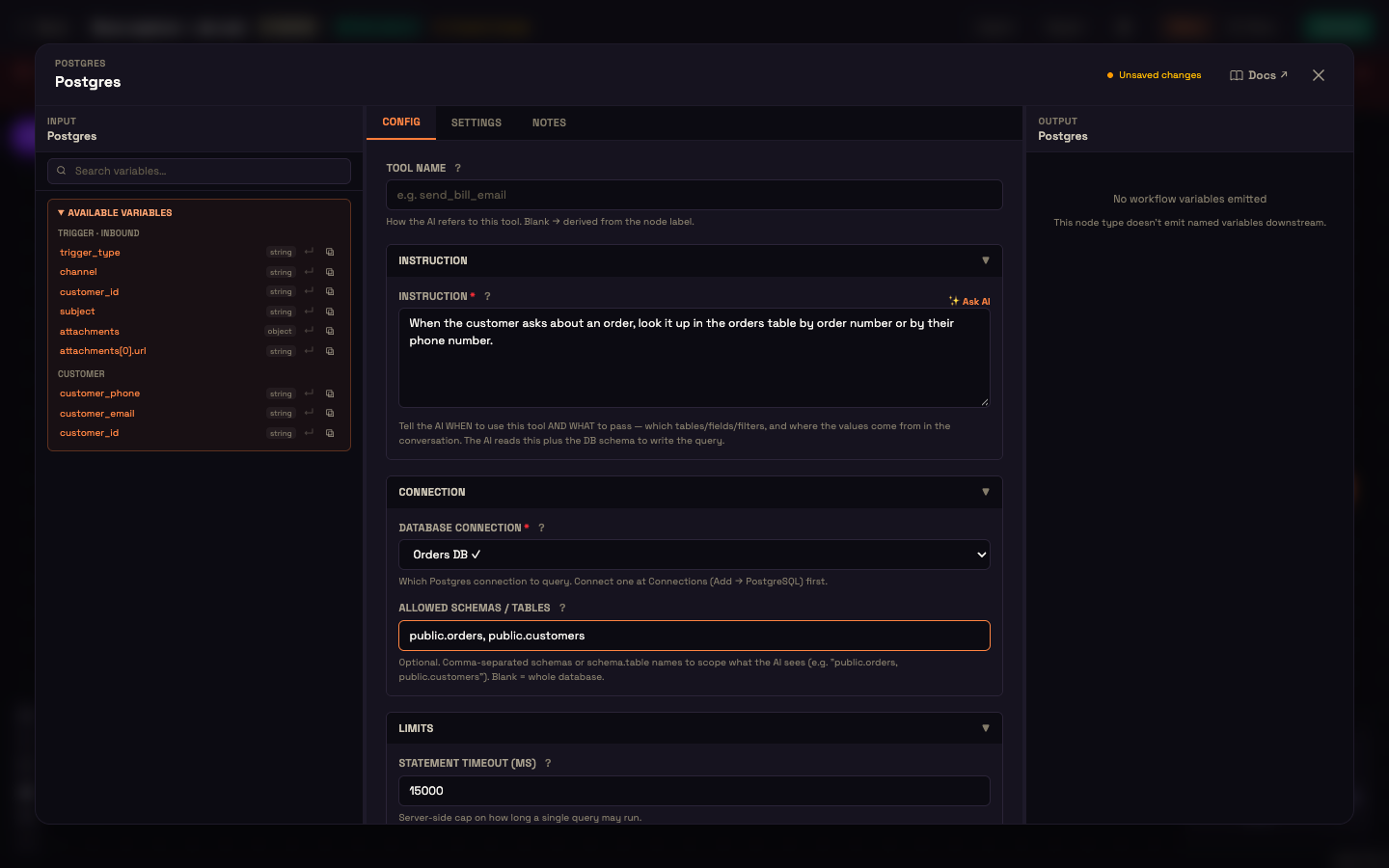
| Section · field | What it does | Default / bounds |
|---|---|---|
| Tool Name | How the AI refers to this action (optional; defaults to the node label). | — |
| Instruction · Instruction (required) | Tells the AI when to use this action and what to pass: which tables or fields, which filters, and where the values come from in the conversation. The AI reads this plus the schema summary to write the query. ✨ Ask AI drafts one. | — |
| Connection · Database connection (required) | Which connected database this node queries. The choice lives on the node, so one agent can talk to several databases. A ✓ next to a connection means it's healthy. | — |
| Connection · Allowed schemas / tables (Postgres) · Allowed tables (MySQL) · Allowed collections (MongoDB) | Optional, comma-separated. Scopes what the agent sees, for example public.orders, public.customers. Blank means the whole database. This shapes the schema summary the agent works from. | Blank (whole database) |
| Limits · Statement timeout (ms) (MongoDB: Operation timeout (ms)) | How long a single query may run before the database cancels it. | 15000 ms, 1000–60000 |
| Limits · Row limit (MongoDB: Document limit) | The most rows a single query may hand back to the agent. Read queries are also wrapped in an outer LIMIT. | 500, 1–2000 |
A fifth piece of context — the schema summary — is discovered automatically and is not something you set. When the node runs, Perfox inspects the connected database (scoped to your Allowed scope) and attaches a compact summary of the tables, columns, and types to the tool, so the agent writes correct queries against your real schema. You never paste table or column names.
Scope is what the agent sees
Use Allowed scope to limit the agent to just the tables or schemas relevant to this agent's job. Anything outside the scope is left out of the schema summary, so the agent doesn't even know it exists.
Safety rails
A database action runs the agent's query behind several built-in guards, so a single query can't reach where it shouldn't, run away, or overwhelm the conversation:
- Egress-guarded connection — every connection resolves and checks the host first, and refuses to connect to internal or private addresses. It also pins the resolved address for the life of the connection, so a host can't be swapped out mid-connect. Your database must be reachable on a public host.
- Time cap — a query that exceeds the Statement timeout is cancelled by the database, with a matching client-side and connect timeout so nothing hangs.
- Row cap — results are trimmed to your Row limit, and read queries are additionally wrapped so a huge result set is cut down at the source rather than pulled back in full.
- Size cap — the result handed to the agent is capped in size, so an oversized payload can't flood the conversation.
- Dangerous operations blocked — operations that could run arbitrary code on the database server or trigger unintended writes are rejected outright before anything reaches your database. For MongoDB this includes server-side-JavaScript and write-in-read operators such as
$where,$function,$out, and$merge. - No query splicing — the query goes straight to the database driver with no string substitution, so there is no injection surface.
- Scrubbed errors — when a query fails, the error is stripped of connection details (host, user, password) before it's fed back to the agent, and mapped to a short hint the agent can act on.
- Fresh, isolated connection per call — each query opens its own connection and always closes it afterward.
Reads and writes
Whether a query can only read, or can also write, is governed by the database user's own permissions on your database — not by a switch in Perfox. If you connected a read-only user, the agent can only read; if the user can write, the agent's write queries will run (subject to the same rails above).
Set your real boundary in the database user's grants
The safest way to control what an agent can do is to connect a database user whose grants match exactly what this agent should be allowed to touch — for example, read-only access to just the tables it needs. The database user's permissions are your real authorization boundary.
When a query can't run
Two situations surface clearly rather than failing silently:
- If the node hasn't been pointed at a database yet, it reports as not configured and the agent knows the tool isn't ready.
- If the connected database's details are missing or invalid, the agent gets a missing connection result with guidance to fix the connection on the Connections page.
On any other error, the (scrubbed) message is fed back to the agent so it can read what went wrong, adjust its query, and try again.
See also
- Database Connectors — connect a PostgreSQL, MySQL, or MongoDB database and test it.
- AI Agent Node — the agent that decides when to call this tool.
- Trigger Nodes — the inbound entry point that starts a conversation.