Sender Nodes
When Priya sends your business a WhatsApp message and your agent replies, something has to carry that reply back to her phone. That's what a sender node does.
There are four, listed under Actions › Messaging in the node picker: Email Sender, SMS Sender, WhatsApp Sender and Phone Caller. They're the only way an agent reaches someone on those channels.
Prerequisites: Trigger Nodes and AI Agent Node.
One node, two ways to wire it
The same sender node can sit in two places, and its settings are the same in both.
| Wiring | Behaviour | Use it for |
|---|---|---|
| On the AI Agent's Action port | The agent can send whenever it decides to during the conversation, including its replies. | An agent that chats back and forth on WhatsApp, SMS or email. |
| On the canvas as a flow step (click + after a node) | It sends once, when the run reaches it. | A message at a fixed point: after a Condition, at the end of a scheduled or webhook flow. |
As a flow step with Message content set to Let the AI write it, the node sends the reply the AI Agent produced earlier in the run. It goes to the person in the conversation, or to the fixed number or address you set.
Settings
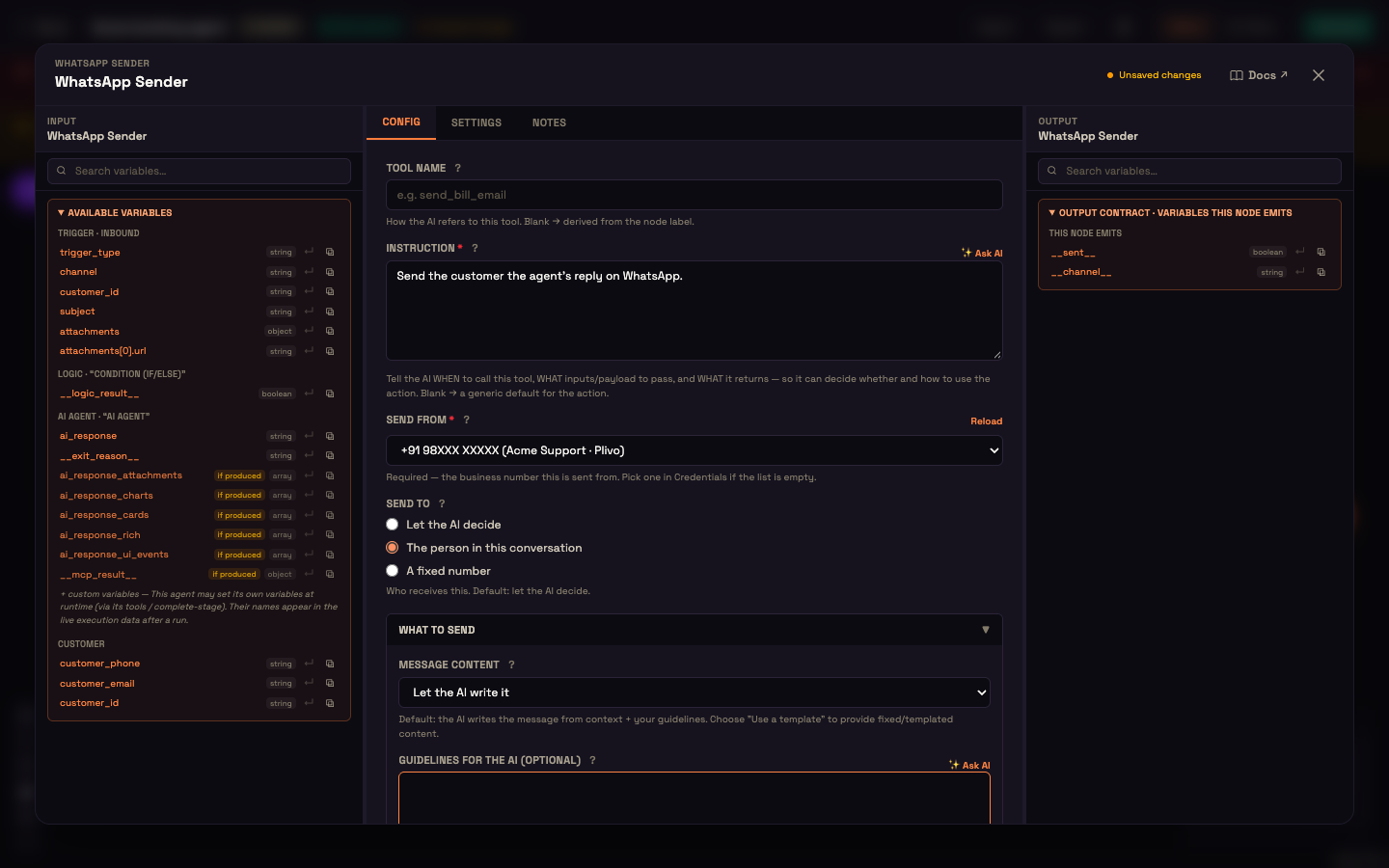
| Setting | What it controls |
|---|---|
| Tool Name | How the agent refers to this sender. Leave it blank to use the node's label. |
| Instruction | Tells the agent when to use this sender and what to send. Click ✨ Ask AI for a suggestion. |
| Send from (Call from on Phone Caller) | Which of your connected numbers or email addresses the message goes out from. Required: you can't activate the workflow without it. Click Reload if you've just added one under Connections. |
| Send to (Call on Phone Caller) | Let the AI decide, The person in this conversation, or a fixed number or address. |
| Message content (Call objective on Phone Caller) | Let the AI write it (the default), or Use a template or fixed text. |
When you choose Use a template or fixed text, more fields appear:
| Sender | Fields |
|---|---|
| Email Sender | Load saved template, Subject, Body |
| SMS Sender | Load saved template, Message (keep it short) |
| WhatsApp Sender | Load saved template, Message. Outside WhatsApp's 24-hour window, WhatsApp only accepts an approved template. |
| Phone Caller | Call objective (what the call should achieve) and Opening line (optional) (the first thing the AI says when the call connects) |
All of them accept {{ variables }}. Email Sender, SMS Sender and WhatsApp Sender also have Guidelines for the AI (optional): soft guidance the agent follows when it writes the message. Email Sender has Attach a file the AI generated earlier for sending a PDF or spreadsheet the agent created in the same conversation.
"Send from" is mandatory on purpose
Choosing the sender explicitly means a scheduled or webhook-triggered send goes out from exactly the same number or address as a reply would.
Each sender covers its own channel only
A WhatsApp Sender lets the workflow send on WhatsApp. It says nothing about SMS or email.
If an agent is triggered on WhatsApp, SMS or email and there's no matching sender on its Action port, the conversation still runs, but the agent's replies aren't sent. The AI Agent node shows a warning before you activate, for example The WhatsApp trigger will start this agent, but there is no WhatsApp Sender…. That's deliberate: a workflow that was never given a way to send shouldn't invent one.
Web and voice need no sender
On Web Chat and voice, the reply comes back through the widget or over the live call. There's no sender node to add.
How replies fit the inbound path
Every non-voice channel flows through one inbound path: the message is de-duplicated, the customer is identified, and the message is matched to a workflow.
De-duplication matters more than it sounds. Messaging providers re-deliver: a forwarded mailbox re-sends, a webhook is retried, a provider posts the same event twice. Because the check happens before anything else, the same message never produces two AI replies.
Worked example
Setup: Asha builds a support workflow for Acme Support: a WhatsApp trigger and an AI Agent, with a WhatsApp Sender on the agent's Action port. She sets Send from to Acme's connected WhatsApp number and Send to to The person in this conversation.
Action: Priya sends "What are your store hours?" to that number. The trigger fires, the agent drafts a reply, and the sender delivers it.
Result: Priya gets the reply on WhatsApp, from the number she messaged.
What just happened: Perfox matched the inbound number to Acme's workflow and sent the reply from the number Asha chose on the node. Had she left Send from empty, Activate would have told her so instead of letting it fail in front of a customer.
Next steps
- Trigger Nodes: the inbound side of a channel.
- Messaging Actions: more on the senders as agent actions.
- Channels Overview: connect an account so a sender has something to send from.