Database Connectors
Asha, an admin at Acme Support, wants her support agent to look up order records live — without exporting CSVs or writing a single line of SQL. She connects her PostgreSQL database on Admin → Connections, adds a Postgres action to the agent, and the agent handles the rest: it reads the schema, writes the query, and returns the rows.
You are Asha. This page shows you how.
Overview
A database connector is your own external database. You connect it once on Admin → Connections (in the Databases section), add a database action to an agent, and that action becomes a live tool the agent calls during a conversation. The agent writes the query from your natural-language instruction plus an automatically discovered summary of your schema. Perfox runs the query against your database and feeds the result — or the error — back to the agent.
Three connector types are supported:
| Type | Engine |
|---|---|
| PostgreSQL | PostgreSQL |
| MySQL | MySQL / MariaDB |
| MongoDB | Your own external MongoDB |
To connect it: go to Admin → Connections, find the Databases section, and click Connect on PostgreSQL, MySQL or MongoDB. To use it: open an agent, add Actions › Databases › Postgres, MySQL or MongoDB, and pick the connection.
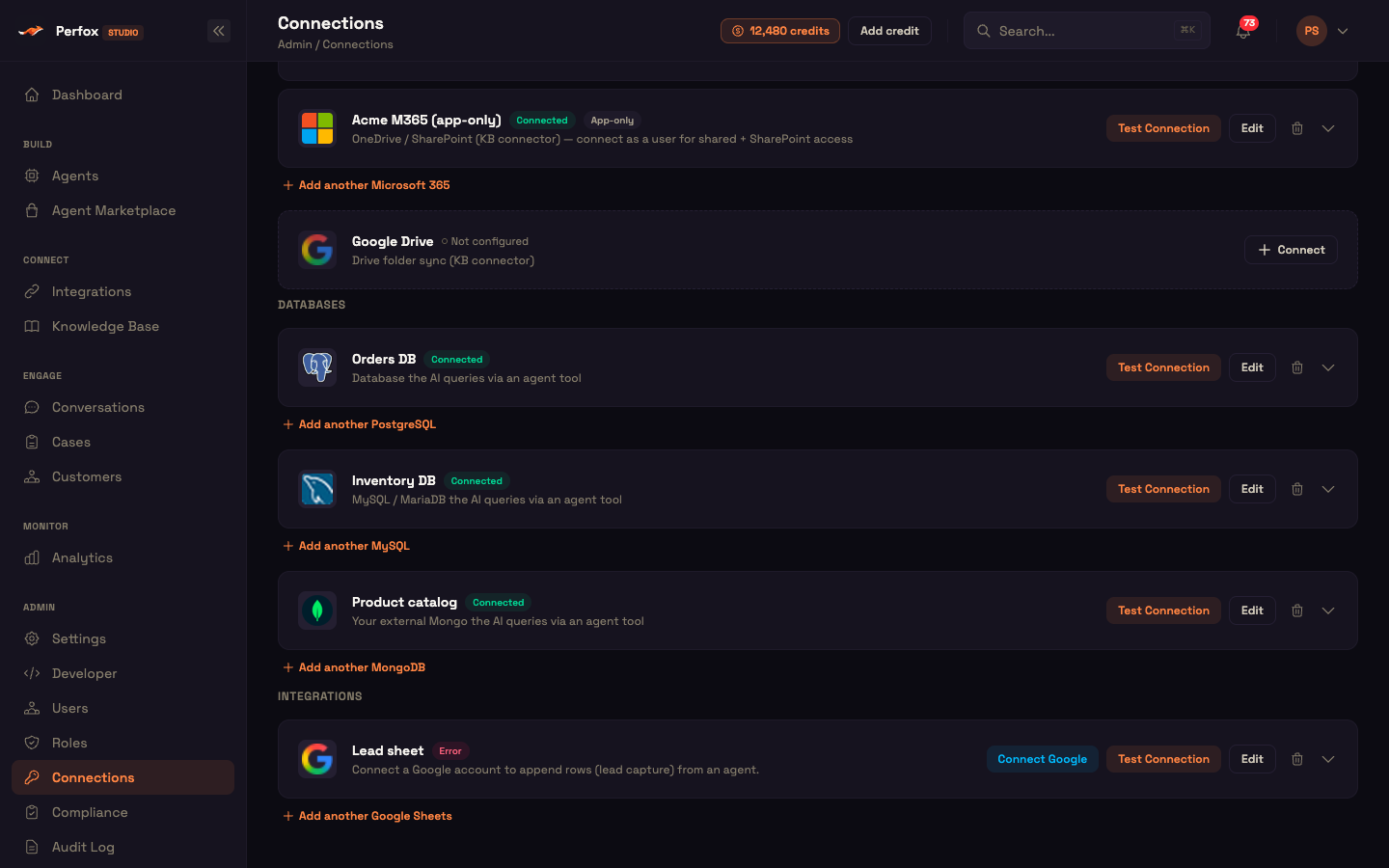
Registering a connector
Each connector is a standard connection you configure once with provider-specific fields. Fill the fields, then run Test Connection (see Testing the connection).
PostgreSQL
| Field | Notes |
|---|---|
| Host | Database host (must be publicly reachable — see Network safety) |
| Port | Default 5432 |
| Database | Database name |
| User | Login user (its grants are your real authorization boundary) |
| Password | Password |
| SSL Mode | disable · require · verify-full |
| SSL CA certificate (PEM) | Optional — only for verify-full against a private CA |
MySQL / MariaDB
Same shape as PostgreSQL, with the Port field defaulting to 3306.
MongoDB (your external database)
Configure it either as a connection string or as discrete fields:
- Connection string — a
mongodb://ormongodb+srv://URI. - Separate fields — Host / Port (default 27017) / Database / User / Password / Auth source (default
admin) / TLS (disable·require·verify-full).
If a connection's fields are missing or invalid it can't be used — at query time the agent is told the connection needs configuring (see The query tool).
See also the Provider Matrix.
Testing the connection
The Test Connection button on a connection card runs a real, live check — not just a field-presence check.
- It first validates the required fields for the type; missing ones fail fast with
Missing required fields: …. - It then opens a real connection (through the network safety check) and runs a minimal probe —
SELECT 1for PostgreSQL / MySQL, or a ping for MongoDB — and reports whether it connected. - The result updates the connection's status and Last tested date, and the card shows a green "✓ Connected" or red "✕ Connection failed" banner with the database's message (with host and password details removed).
The database actions
The Postgres, MySQL and MongoDB actions (under Actions › Databases in the node picker) share the same settings:
| Field | What it does | Default / bounds |
|---|---|---|
| Database connection | Which connected database this action queries. One agent can use several databases, one action each. | — |
| Instruction (required) | Tells the AI when to use this tool and what to pass — which tables, fields and filters, and where the values come from in the conversation. Has an AI-assist button. | — |
| Allowed schemas / tables (MongoDB: Allowed collections) | Comma-separated schemas or schema.table names that limit what the AI sees, e.g. public.orders, public.customers. Blank = the whole database. | Blank |
| Statement timeout (ms) (MongoDB: Operation timeout (ms)) | How long a single query may run. | 15000, range 1000–60000 |
| Row limit | The most rows handed back to the AI; also applied as an outer LIMIT on SELECTs. | 500, range 1–2000 |
One more piece of context — the schema summary — is not something you set. It is discovered automatically when the node runs and attached to the tool so the agent knows your tables and columns (see Schema summary).
The query tool — the agent writes the query
Each database action becomes a tool the agent calls during the conversation. The agent writes the query itself from your instruction plus the live schema, so you never hand-write SQL:
| Node type | The agent emits |
|---|---|
| Postgres | ONE full PostgreSQL statement |
| MySQL | ONE MySQL / MariaDB statement |
| MongoDB | A structured MongoDB operation (see MongoDB operations), not a query string |
The connection, timeout and row limit you set are applied behind the scenes — the agent can't see or change them; it supplies only the query. SQL goes straight to the database driver with no template substitution, so there is no string-concatenation injection surface.
The result returns to the agent as:
- SQL — row count, columns, and rows
- Mongo — row count and rows
- Failure — an error status with the (scrubbed) error message
On failure the (scrubbed) error is fed back to the agent so it can read it, fix its query, and retry. Two special results:
- An action with no connection selected tells the agent it isn't configured.
- A connection with missing fields tells the agent which provider needs configuring and how.
Whether writes are allowed is decided by the database user's own permissions. Give that user only the grants you want the agent to have.
Worked example — Priya checks her order
Setup: Asha has connected Acme Support's PostgreSQL database and added a Postgres action to the support agent, with Allowed schemas / tables set to public.orders and a row limit of 50. Its instruction reads: "Use this to look up a customer's orders by their phone number."
Action: Priya messages the agent: "Where is my latest order?" The agent calls the Postgres tool. It reads the discovered schema, writes a SELECT against public.orders filtered by Priya's phone number, and Perfox runs it.
Result: The agent receives Priya's latest order and replies: "Your order #4821 shipped yesterday and should arrive on Thursday."
What just happened: Asha never wrote SQL and Priya never left the chat. The agent wrote and ran the query from the live schema and the conversation — within the row limit and timeout Asha set — and turned the result into a reply.
Automatic schema summary
So the agent writes correct queries, Perfox inspects your schema and attaches a compact summary to the tool — you never paste table or column names.
- What it reads — for PostgreSQL / MySQL: tables, columns, data types, nullability and primary keys (system schemas are left out); for MongoDB it samples collections.
- Scoped — to Allowed schemas / tables: a bare name is a whole schema,
schema.tableis one table (case-insensitive); blank = the whole database. - Cached — for 5 minutes, so the agent doesn't re-inspect every turn; refreshed automatically when the connection is edited or deleted.
- Byte-capped — at about 20 KB, so a huge schema can't overflow the agent's context.
- Fail-soft — if inspection fails, the tool tells the agent "schema unavailable; write your best query, the error will tell you if a table/column is wrong" rather than blocking.
No identifier splicing
Scope values are passed as parameterized query values, never spliced in as SQL identifiers.
MongoDB operations
For MongoDB the agent writes a structured operation — operation, collection, filter, projection, document(s), update, pipeline, sort and limit — not a query string, so nothing can be spliced into a query.
| Category | Supported operations |
|---|---|
| Read | find, countDocuments, aggregate |
| Write | insertOne, insertMany, updateOne, updateMany, deleteOne, deleteMany |
The same limits apply: the operation timeout caps how long it may run, the row limit caps the result count, plus the ~1 MB size cap and cleaned-up errors (see Safety rails).
One MongoDB-specific protection: server-side JavaScript and write-in-read operators are rejected outright — $where, $function, $accumulator, $out, $merge — scanned recursively across the filter, pipeline, and update (they would run arbitrary code on the database server or trigger unintended writes). Whether writes are allowed is still decided by the MongoDB user's own roles.
Safety rails
Every query runs with safety limits so one query can't hang or return a flood of data. The database user's own grants remain your real access control:
- Statement timeout — a server-side statement timeout plus a client-side timeout (statement timeout + 2 s) plus a 10 s connect timeout bound a runaway query.
- Outer LIMIT wrap — SELECT-shaped statements are wrapped in an outer
SELECT * FROM (…your query…) LIMITset to your configured Row limit, so a huge result set is trimmed at the source. - Row cap — results are trimmed to the row limit (default 500, max 2000) and flagged as truncated.
- Byte cap — the serialized result is capped at about 1 MB; going over marks the result truncated.
- Cleaned-up errors — database errors have the host, user, password and database name removed before the agent sees them, and are turned into a short hint. Examples:
| Condition | Hint returned to the agent |
|---|---|
| Unknown table | "unknown table — check the name against the schema" |
| Timeout | "the query exceeded the statement timeout" |
| Permission denied | "permission denied — the connected user cannot do this" |
Each query opens a fresh connection and always closes it afterwards.
Connection mechanics
How a connection is opened, for both queries and Test Connection:
- A fresh connection per query — opened for each query and always closed afterwards.
- TLS modes — SSL mode for Postgres/MySQL, TLS for Mongo:
disable— no encryption.require— encrypt in transit without CA verification (the default).verify-full— verify host + CA; pair with the optional SSL CA PEM bundle for a private CA.
- Certificates still verify — the connection goes to the exact address the safety check approved, while TLS still checks the certificate against your hostname.
- Timeouts — 10 s connect timeout; the server-side statement timeout is passed through per call.
Network safety (public hosts only)
Every database connection — queries and Test Connection — passes a network safety check first, so a connection can only ever reach a public database host:
- It looks up the host and rejects any non-public address — cloud-metadata endpoints, loopback, private ranges, link-local and carrier-grade NAT. Anything it can't parse is refused.
- The connection then goes to exactly the address that was checked, so the host can't be switched afterwards.
- If any address the host resolves to is private, the connection is refused.
- A local or private test database must therefore be reachable on a public host (for example through a Cloudflare tunnel).
If a host is blocked or can't be resolved, the agent is told the connection was blocked.
You're ready
You can now connect your database, scope what the agent sees, and let it query live data during conversations — without writing SQL or exporting files.
- Connections (setup guide) — connect a provider and confirm it with Test Connection
- Database actions — add a database action to an agent
- Provider Matrix — every provider and its fields side by side