Agent Team Node
One agent can't be an expert in everything. Acme's front desk gets booking questions and billing questions, and each needs different knowledge, tools and tone. The Agent Team node lets several AI Agents work together on each message: a lead agent coordinates, and specialist agents do the work.
You'll find it under Core in the node picker, next to AI Agent.
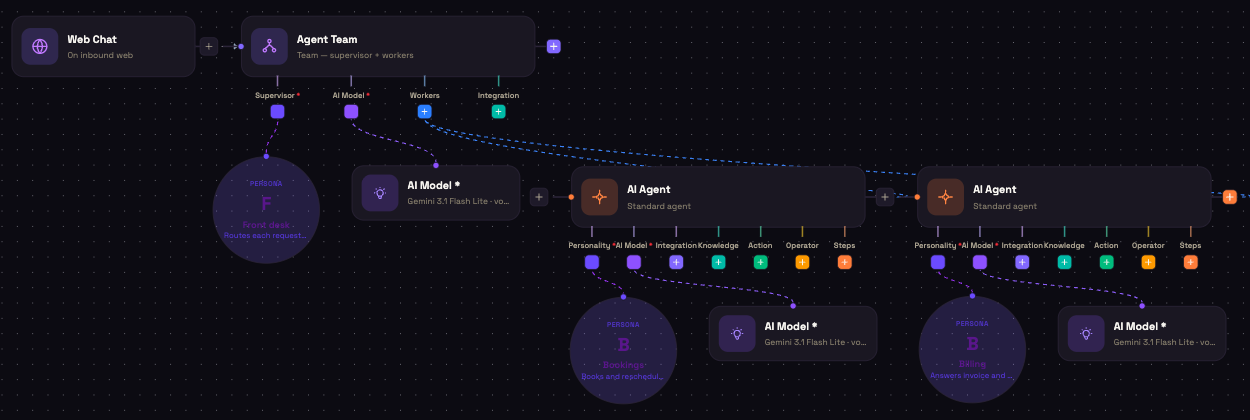
How a team is built
The Agent Team node has four ports along its bottom edge:
| Port | What to connect |
|---|---|
| Supervisor * | A Personality for the lead agent: who it is and how it should route or combine work. Required. |
| AI Model * | The lead agent's model. Required. |
| Workers | One AI Agent node per specialist. Click + on the port and pick AI Agent. |
| Integration | Integrations for the lead agent itself. These are used in the Refine loop and Parallel fan-out modes. In Team mode the lead agent only routes, so give tools to the workers instead. |
Each worker is a full AI Agent with its own Personality and AI Model, plus any Knowledge, Integration and Action sub-nodes it needs. Workers can use different models from each other and from the lead agent.
Coordination Mode
Open the node to choose how the team works together.
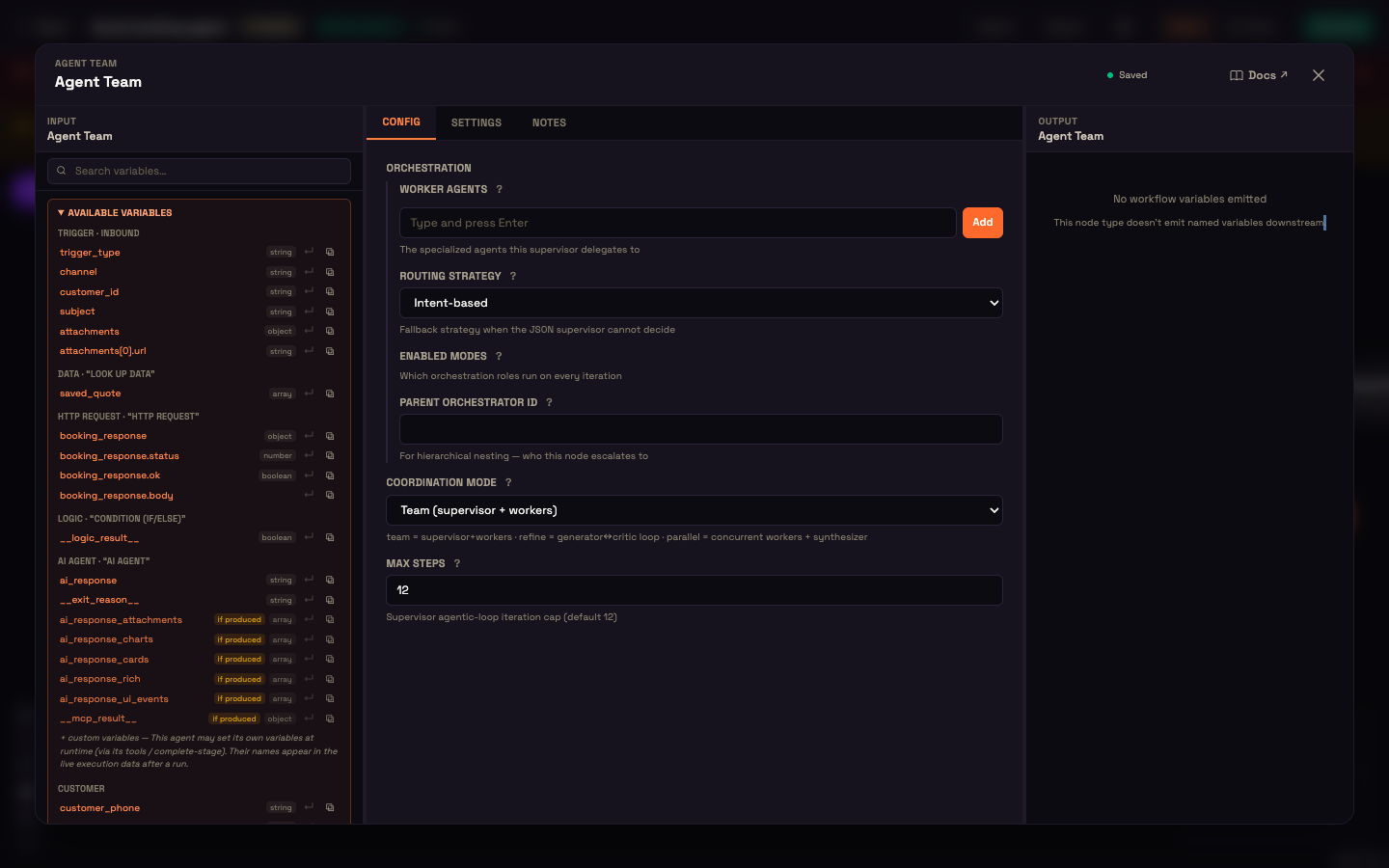
| Coordination Mode | How each message is handled |
|---|---|
| Team (supervisor + workers) | The lead agent picks the one worker that best fits the customer's main request, hands it over, and replies using that worker's answer. |
| Refine loop (generator + critic) | The lead agent writes an answer and the first worker reviews it. They go back and forth until the critic is satisfied or the round limit is reached. Any other workers are ignored. |
| Parallel fan-out (+ synthesizer) | Every worker answers at the same time. The lead agent combines their answers into one reply. |
Max Steps caps how many rounds the team takes on one message: supervisor iterations in Team mode, review rounds in Refine loop. A new node starts at 12.
The other settings in the panel (Worker agents, Routing Strategy, Enabled Modes and Parent Orchestrator ID) can stay at their defaults. Connect workers on the canvas through the Workers port.
What the team produces
The team's final reply is the agent reply for the turn, stored as {{ ai_response }}, just like a single AI Agent's. On Web Chat and voice it goes straight back to the customer. On WhatsApp, SMS and email, wire a sender for that channel so the reply is delivered.
Every worker's work is recorded in the run, so the run viewer shows which specialist handled each message.
Worked example: Acme's front desk
Setup. Asha adds an Agent Team after her Web Chat trigger. Its Supervisor Personality is Front desk: routes each request to the right specialist. She connects two workers:
- Bookings: Personality Books and reschedules appointments, with Acme's booking integration.
- Billing: Personality Answers invoice and refund questions, with the billing integration and the Billing FAQ Knowledge folder.
She leaves Coordination Mode on Team.
Action. Priya writes: "I was charged twice for last week's test."
Result. The Front desk hands the message to Billing. Billing looks up the payments and explains the duplicate charge. The Front desk replies to Priya with that answer.
What just happened. Priya talked to one assistant. Behind it, the right specialist, with the right tools and knowledge, did the work. Adding a new area later means connecting one more worker.
Agent Team or Steps?
- Use an Agent Team when different kinds of request need different specialists.
- Use Steps when one agent has to follow a fixed order, such as choose, check, collect, then book.
Next steps
- AI Agent Node: configure each worker.
- Personality sub-node: write the supervisor's and workers' personalities.
- Steps (Agent Process): a guided process for a single agent.