Audit Log
When something changes in your workspace — a new agent activated, a connection updated, a user invited — you want a clear answer to "who did that, and when?" The Audit Log is that answer: a searchable, immutable trail of every configuration change across your workspace.
Click Audit Log under Admin in the sidebar (/audit-log). The Admin section is shown to workspace admins, and reading the trail needs the settings:read permission, which every admin has.
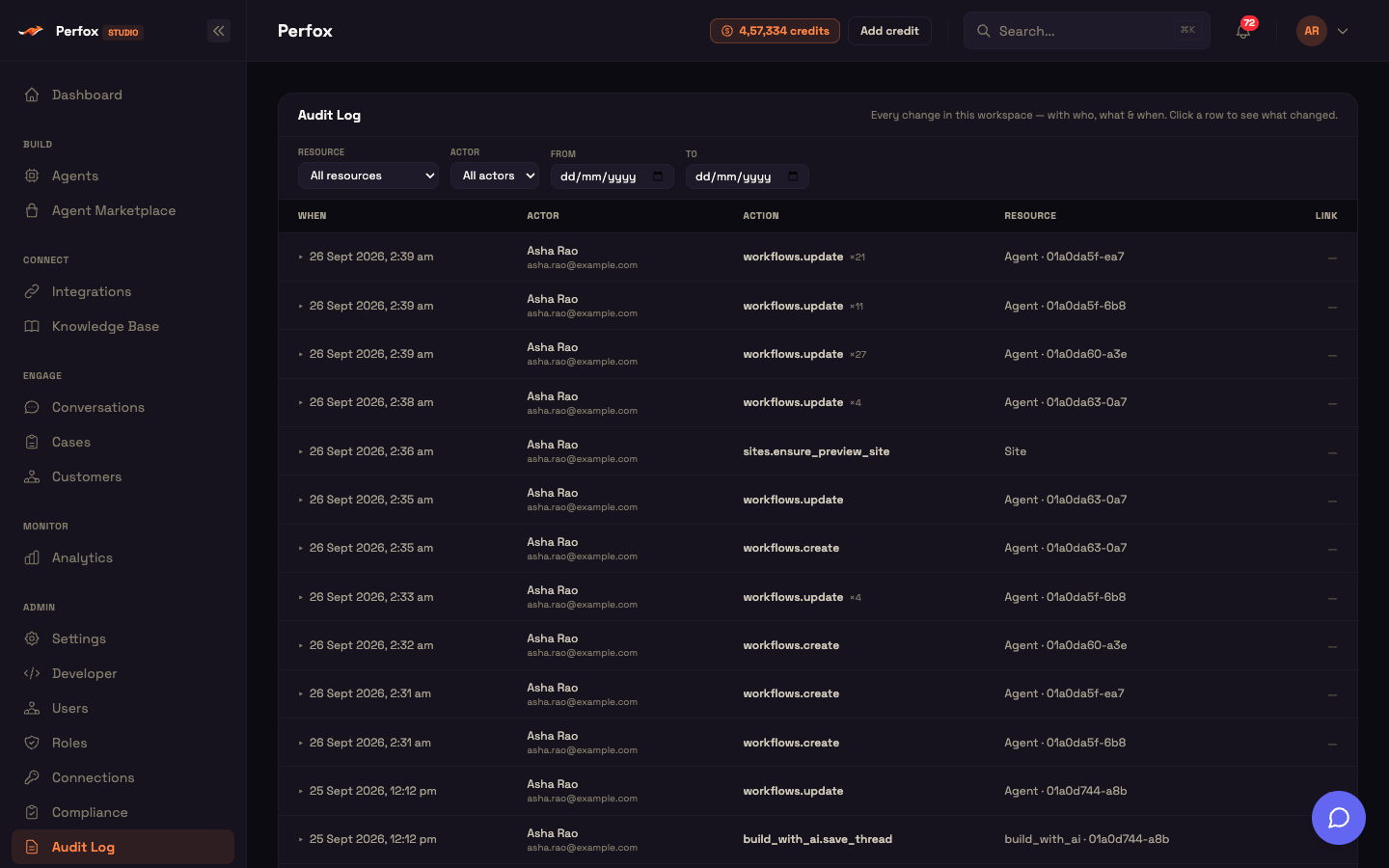
What gets recorded
Perfox writes an audit row automatically whenever an admin successfully creates, updates, deletes, or otherwise changes something in your workspace. There is no per-feature opt-in — auditing is built into the platform, so new settings and features are captured the moment they ship.
Change actions include: create, update, delete, upsert, publish, unpublish, archive, restore, duplicate, rename, move, merge, reindex, invite, revoke, rotate, import, assign, upload, redeem, suspend, and more. Pure reads — viewing or listing data — are never audited.
Each row records:
- Actor — who made the change (resolved from a stable id, never a name that can be overwritten)
- Action — the canonical operation performed
- Resource — what was touched, with a friendly label and a short id
- Change detail — the exact fields that changed (stored redacted — more on this below)
- Client IP — the originating IP, for forensic review
- Timestamp — when it happened (for example
26 Sept 2026, 2:37 am)
Auditing is best-effort: a logging failure never blocks or breaks the underlying change.
Filtering the trail
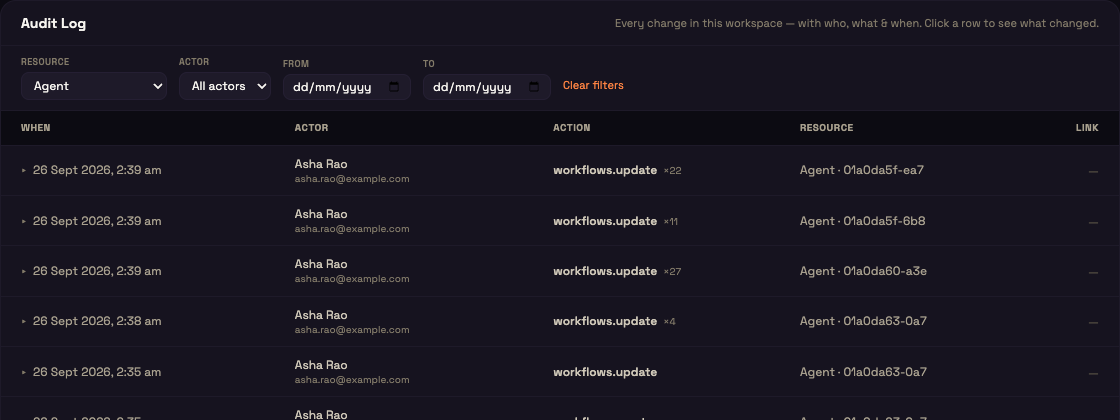
The filter bar has four controls and a Clear filters link. Any change resets the table to page 1, and all filtering happens server-side so results are accurate even on a long history.
| Control | Values | Effect |
|---|---|---|
| Resource | All resources, Agent, Agent template, MCP server, Connection, Knowledge base, KB folder, KB file, KB connector, Campaign, Contact list, Segment, Message template, Customer, User / Role, Settings, Compliance, Agent folder, Site | Scopes to one resource type. |
| Actor | All actors, User, System, Agent | Scopes by actor type. |
| From | date picker | Lower bound on the event time. Constrains the To field's minimum so you can't invert the range. |
| To | date picker | Upper bound on the event time, expanded to end-of-day (23:59:59.999). Constrains the From field's maximum. |
| Clear filters | — | Appears only when a filter is active; resets all four controls and returns to page 1. |
When filters are active and nothing matches, the empty state reads "No audit events match these filters."
Reading the table
Each row in the table shows:
| Column | What it shows |
|---|---|
| When | The event timestamp, formatted as day, month, year and time (for example 26 Sept 2026, 2:37 am). Rows with change detail show a ▸/▾ disclosure caret here. |
| Actor | Who performed the action — the user's name with their email underneath. If the user can't be resolved (for example a deleted account) it shows User plus a short id; automated actions show System, Agent or MCP Gateway. |
| Action | The action name as recorded, in area.operation form — for example workflows.create, workflows.update, credentials.update. A muted "×N" badge appears when repeat edits were coalesced. |
| Resource | A friendly resource-type label plus a truncated resource id (e.g. Agent · 019e5e32abcd). |
| Link | An Open → link for billing and compliance rows, otherwise a dash. |
The table has a loading state, an empty state, and bottom pagination.
Actor types
Each audit row stores a stable actor id (a UUID) plus an actor type — never a name or email — so a later rename or account deletion can never corrupt immutable history. When you open the page, Perfox batch-resolves the actor ids for that page and attaches a display-only name and email.
| Actor type | Meaning |
|---|---|
| User | A human admin |
| System | An automated or background action |
| Agent | An AI agent action |
| MCP Gateway | An action taken through a connected MCP tool integration |
Unresolved ids — system and agent actors, or deleted users — render their type label.
Friendly resource labels
The Resource column translates the underlying resource key into a human label. The cell renders as "<Label> · <first 12 chars of resource id>", or just the label when there is no id. Resource types without a friendly label show their raw key — for example Build with AI conversations appear as build_with_ai.
| Resource | Label |
|---|---|
| Workflows | Agent |
| Agent templates | Agent template |
| Workflow templates | Workflow template |
| MCP servers | MCP server |
| Credentials | Connection |
| Knowledge bases | Knowledge base |
| KB folders | KB folder |
| KB files | KB file |
| KB connectors | KB connector |
| Campaigns | Campaign |
| Contact lists | Contact list |
| Segments | Segment |
| Message templates | Message template |
| Suppression list | Suppression |
| Customers | Customer |
| Users & roles | User / Role |
| Settings / workspace config | Settings |
| Agent folders | Agent folder |
| Sites | Site |
| Credit transactions | Billing |
Expandable change detail
Any row that carries a non-empty change payload is clickable — clicking it expands an inline "Change detail" panel that pretty-prints the recorded payload as JSON in a scrollable mono code block. Clicking again collapses it. Only one row is expanded at a time. Rows without a payload aren't clickable and show no caret.
Row deep-links
Certain rows carry a trailing Link cell that jumps to related context:
- A billing row links "Open →" to
/accounts/transactions(the credit ledger). - A compliance row links "Open →" to
/compliance. See Compliance & DPDP. - Other rows show a plain "—".
Clicking a deep-link does not toggle the row's expandable change detail — the two interactions are isolated, so you can inspect the payload and navigate to context independently.
Worked example: tracing a settings change
Setup — Asha is the workspace admin at Acme Diagnostics. A colleague mentions a provider connection was changed yesterday but isn't sure who did it.
Action — Asha opens Admin → Audit Log, sets Resource to Connection, and sets From to yesterday's date. The table now shows only connection-related rows from that day. She spots a row: credentials.update at 3:42 PM with a user actor. She clicks the row to expand the Change detail panel.
Result — The panel shows the exact fields that changed, with any secrets redacted. The row itself shows who made the change, by name and email.
What just happened — Perfox recorded the change automatically at the moment it was saved, wrote the actor's stable id (not their name), and resolved the display name only when Asha opened the page. Even if that colleague had since been renamed or removed from the workspace, the audit row would still show their original account's id and the resolved display at the time of reading.
Coalesced repeat edits (×N)
To keep autosave from flooding the trail, rapid repeat edits by the same actor, of the same action, on the same resource, within a 120-second (2-minute) window collapse into a single row. Within the window Perfox updates that one row in place: it bumps the timestamp, replaces the stored detail with the latest payload, and increments the repeat count.
In the table this shows as a muted "×N" badge next to the Action — for example:
text
workflows.update ×7meaning "edited 7 times in quick succession". A single, un-repeated action has no badge. When you expand that row, you see the latest payload from the burst.
How change payloads are stored safely
Before a change payload is stored, Perfox sanitizes it:
Secret masking — any field whose name looks like a secret (case-insensitive matches on secret, token, password, api key, auth, private key, access key, credential, passphrase) is replaced with the literal string
[redacted], recursively up to 8 levels deep and through arrays. Editing a connection never records the real key.PII redaction — emails, phones, and other personal data are deeply masked across the whole payload.
Size cap — the serialized detail is capped at 8,000 bytes. A larger payload is stored as:
json{ "truncated": true, "size": 24576, "preview": "…" }with a leading 8 KB preview rather than the whole thing.
Unserializable payloads are stored as:
json{ "note": "unserializable payload" }
The resolved actor name and email are attached only at read time, never written onto the immutable row.
Client IP is stored on each immutable row but is not currently surfaced as its own table column.
Pagination
The trail pages server-side, 50 rows per page. The footer (shown when there is more than one page) reads:
text
Page X of Y · N entrieswith Prev / Next buttons that disable at the ends. Rows are sorted newest-first. Total count and total pages are computed on the server so paging always reflects the active filters.
Full field reference
| Field / option | Type / values | Default | What it does |
|---|---|---|---|
| Actor id | UUID | — | Stable, immutable actor reference; resolved to name/email at read time. |
| Actor type | User | System | Agent | MCP Gateway | — | Classifies the actor; drives the Actor filter and fallback label. |
| Action | canonical action name | — | The audited operation; kept canonical in the Action column. |
| Resource type | resource key | — | Mapped to a friendly label in the Resource column. |
| Change detail | redacted JSON object | — | The changed fields; pretty-printed in the expandable panel. |
| Client IP | string | — | Caller's client IP (forwarded-for aware); stored, not shown as a column. |
| Event time | timestamp | — | Shown as 26 Sept 2026, 2:37 am; rows sort newest-first. |
| Repeat count | integer | 1 | Number of coalesced repeat edits; renders as the ×N badge. |
| Coalesce window | duration | 120,000 ms (2 min) | Same actor + action + resource within this window collapse into one row. |
| Redaction — secret keys | pattern match | on | Fields whose name looks like a secret → [redacted], up to 8 levels deep. |
| Redaction — PII | deep mask | on | Emails, phones and other personal data masked across the whole payload. |
| Redaction — size cap | bytes | 8,000 | Larger detail stored as a truncated summary with an 8 KB preview. |
| Filter: Resource | dropdown (see table above) | All resources | Scopes by resource type. |
| Filter: Actor | All actors | User | System | Agent | All actors | Scopes by actor type. |
| Filter: From / To | date pickers | none | Bounds the event time; To → end-of-day; the two constrain each other. |
| Clear filters | button | hidden until a filter is set | Resets all filters, returns to page 1. |
| Pagination | server-side | 50 rows/page | Footer "Page X of Y · N entries"; Prev/Next disable at ends. |
| Sort | — | event time, newest first | Fixed. |
You can now trace every change in your workspace
You have a complete, tamper-resistant trail: filter by resource or actor, expand any row to see the exact (redacted) payload, and follow deep-links to the affected area.
Next steps
- Compliance & DPDP — the compliance deep-link target; where audit rows for DPDP consent, data-subject rights, and the PII-access log live.