Voice (Phone and Browser)
Priya calls Acme Diagnostics at 9 pm to ask when her lab report will be ready. Nobody is at the front desk, but the call still gets answered, live, by your agent. This page explains the voice channels available today, how a call reaches your agent, how the agent grounds its answers, and how every call is recorded.
The voice channels
| Channel | How it reaches the agent | What you set up |
|---|---|---|
| Browser voice | The mic button in your web chat widget | Turn on Enable voice chat in the Web Chat trigger. Perfox manages the rest |
| Phone: inbound | Calls to your Plivo number | A Plivo connection and a Phone Call trigger on that number |
| Phone: outbound | The agent's Phone Caller action, the widget's Call Me button, or an operator dialling out from Conversations | A Plivo call number |
WhatsApp is a messaging channel: the agent transcribes voice notes and answers them, but there is no WhatsApp calling.
Browser voice has a screen, so the agent can show cards, charts and files, and the visitor can upload a file during the call. A phone call is audio only, so the agent keeps spoken answers short and sends documents and links by SMS, WhatsApp or email instead of reading them out.
Choosing the voice
Every voice channel uses the same Voice agent model setting on the agent's AI Model sub-node. Pick Live (one speech-to-speech model from Gemini or OpenAI) or Pipeline (speech-to-text → a chat model → text-to-speech, using Sarvam or ElevenLabs voices). Then pick a voice. The same choice applies in the browser and on the phone. You don't need a provider account. The full list of models and voices is on Voice Providers.
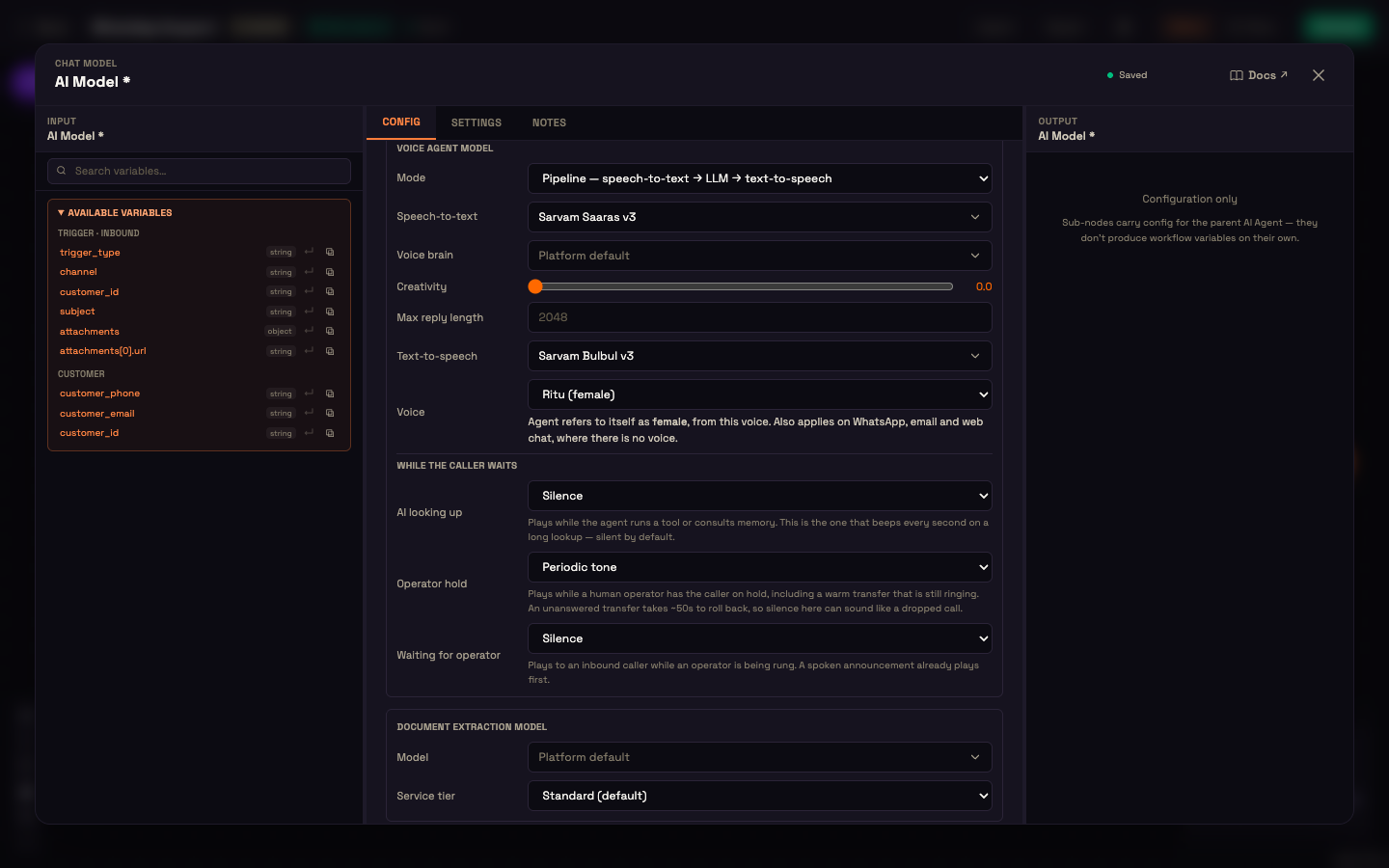
The same section also sets what callers hear while they wait (While the caller waits): during a lookup, on operator hold, and while an operator is being rung.
Setup (phone)
- Admin → Connections → Plivo: add your Plivo account with a call number. In the Plivo editor, Configure in Plivo points the number's answer URL at Perfox for you.
- Open Agents, create an agent and add a Phone Call trigger. Under Business contact, pick your call number. Each number belongs to one agent. Optionally, restrict callers with Include or Exclude (exact numbers or prefixes such as
+91). - To let the agent place calls as well, connect a Phone Caller action to the AI Agent. Set Call from (the caller ID, required), Call (let the AI decide, the person in this conversation, or a fixed number) and Call objective.
- Click Activate.
The agent answers inbound calls directly, with no Sender needed. Browser voice needs no setup beyond the Web Chat trigger's voice toggle. See Web Chat.
Grounding answers in your Knowledge Base
When a call starts, the agent speaks its greeting before it listens. From then on it searches your connected Knowledge Base folders whenever a question needs them, the same knowledge tools it uses in chat. If it starts to answer a question without looking, Perfox searches for that turn as a backstop. The agent answers from your own documents, not from the model's general knowledge.
A call, end to end
Setup. Asha has connected Acme's Plivo account, built an agent with a Phone Call trigger on the clinic number, and connected the "Lab Reports" Knowledge Base folder.
Action. Priya dials the clinic. The agent picks up and greets her.
Result. Priya hears:
"Thanks for calling Acme Diagnostics. How can I help this evening?"
Priya: "When will my blood test report be ready?"
"Reports from an evening sample are usually ready by the next afternoon. I've sent you the report link by SMS so you have it handy."
What just happened. The Phone Call trigger matched the call to Asha's agent by the number Priya dialled. The agent looked up "Lab Reports" for the answer, kept the spoken reply short, and texted the link instead of reading it aloud. The call was recorded.
Recording
Every voice session, phone or browser, produces three audio files, stored privately:
| File | Content | Rate |
|---|---|---|
| Caller track | caller, mono | 16 kHz browser / 8 kHz phone |
| AI track | AI, mono | 24 kHz browser / 8 kHz phone |
| Combined track | stereo, caller left / AI right | 16 kHz, with silence gaps rebuilt |
A browser close, a hang-up or a dropped connection never loses the recording. You open recordings from the Conversations view through short-lived private links. Admins and anyone with permission to read conversations can do this.
Who the caller is
Perfox matches a caller to a customer by their phone number, in full international format. One number that calls, texts and messages you on WhatsApp is one customer. If your systems already know the customer by an external ID, that takes priority. You choose how history is grouped under Settings → Cross-Channel Customer Identity. See Customer Identity.
Where to go next
- Voice Providers: every voice model and voice you can pick.
- Web Chat: turn on browser voice and Call Me.
- Voice & Dial-Out (widget): start voice from your own site.
- Plivo Setup: the number that answers the call.