Email Providers (in/outbound)
When Priya emails Acme Support, she expects the reply to arrive in the same thread — not as a fresh email she has to piece together. You get that by connecting the mailbox or email service your team already uses. This page helps you pick a provider, fill in its fields, and understand how inbound mail reaches your agent and how replies stay threaded.
Connect email providers on Admin → Connections, in the Email section. The shared connect / test / delete flow is described in the Connections setup guide.
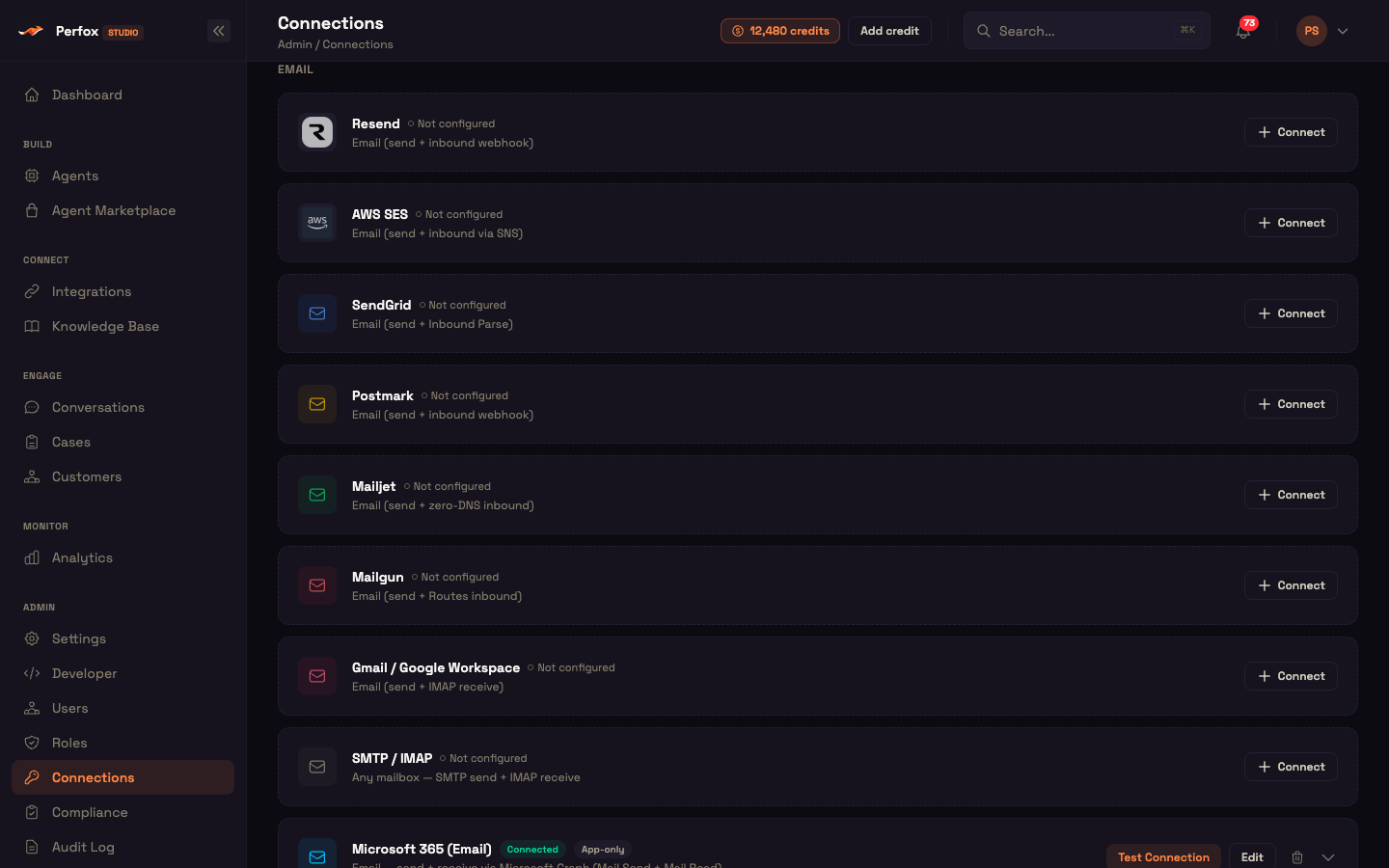
The provider matrix
Nine email providers are available. All can send, and all thread replies under the original message; they differ in how inbound mail reaches your agent.
| Provider | Send | Receive | How inbound arrives |
|---|---|---|---|
| Resend | ✓ | ✓ | Inbound webhook |
| SendGrid | ✓ | ✓ | Inbound webhook (Inbound Parse) |
| Postmark | ✓ | ✓ | Inbound webhook |
| Mailjet | ✓ | ✓ | Inbound webhook (parse route, no DNS needed) |
| Mailgun | ✓ | ✓ | Inbound webhook (Routes) |
| Gmail / Google Workspace | ✓ | ✓ | Mailbox check about every 60 seconds |
| SMTP / IMAP | ✓ | ✓ | Mailbox check about every 60 seconds |
| Microsoft 365 (Email) | ✓ | ✓ | Microsoft Graph new-mail notifications |
| AWS SES | ✓ | via Perfox support | Receiving needs a one-time setup by Perfox support |
AWS SES is self-serve for sending. To receive mail on SES, contact Perfox support — or choose one of the providers above, which you can set up for receiving yourself.
Configuring each provider
Each provider has its own fields in the Connect form; secrets are masked.
Resend, SendGrid, Postmark, Mailjet, Mailgun
Each has an Email group (sending) and an Inbound group (receiving). In your provider's console, point inbound mail at https://<your-workspace>-api.perfox.ai/webhooks/email/<provider> — for example /webhooks/email/postmark.
| Provider | Email (send) | Inbound (receive) |
|---|---|---|
| Resend | API Key (re_…), From Email (on a verified domain) | Webhook Signing Secret (whsec_…, optional), Inbound address (<id>.resend.app or your domain, optional) |
| SendGrid | API Key, From Email, From Name (optional), Data Residency (global · eu) | Inbound Parse hostname (optional, e.g. parse.acme.com) |
| Postmark | Server API Token, From Email, Message Stream (default outbound) | Inbound webhook secret (optional) |
| Mailjet | API Key (public), Secret Key (private), From Email, From Name (optional) | Parse route address (parse-in1.mailjet.com, optional) |
| Mailgun | Private API Key, Sending Domain (e.g. mail.acme.com), Region (us · eu), From Email | Webhook signing key (optional — defaults to the API key) |
- SendGrid Data Residency picks the global or EU API.
- Postmark and Mailjet can receive without any DNS changes: Postmark gives you an
…@inbound.postmarkapp.comaddress and Mailjet a parse-route address. - Mailgun Region picks the US or EU API.
Gmail / Google Workspace
Gmail connection is temporarily unavailable
Connecting Gmail / Google Workspace from the Connections page isn't working right now — we're fixing it. In the meantime, connect your mailbox with another email provider, such as SMTP / IMAP.
Gmail connects through your own Google OAuth app — the same kind of setup as Google Sheets. Enter the OAuth Client ID and OAuth Client Secret, then click Save & Connect Google and approve access with the mailbox's Google account.
- Sending — replies go through the Gmail API from the connected account, threaded under the original message.
- Receiving — Perfox checks the inbox about every 60 seconds, hands each unread message to your agent, and marks it read so it's handled only once.
- Test — refreshes access and reads your Google profile (no email is sent): "Connected as <email>".
Microsoft 365 (Email)
A dedicated Microsoft 365 (Email) connection sends and receives through Microsoft Graph. It can use the same Entra app as your Microsoft 365 knowledge-base connection, with Mail.Send and Mail.Read added. See Connecting Microsoft 365 for the setup steps and permissions.
- App-only — no sign-in; enter the Mailbox to send/receive as. The app acts as that mailbox.
- Delegated — a user signs in once and the connection sends and receives as their mailbox.
- Receiving — Perfox subscribes to new-mail notifications on the inbox and renews the subscription automatically well before it expires. The listener runs only while at least one published agent has an email trigger using this mailbox.
SMTP / IMAP — any mailbox
SMTP / IMAP works with almost any mailbox:
- SMTP (send) — SMTP Host, SMTP Port (587 / 465), SMTP Username, SMTP Password / App Password, From Email.
- IMAP (receive) — IMAP Host, IMAP Port (993), IMAP Username, IMAP Password / App Password. Perfox checks the inbox about every 60 seconds and marks each message read once handled.
Either half alone is a valid connection. An SMTP-only connection can send but won't be offered to email triggers; an IMAP-only connection can receive but won't be offered to the Email Sender.
Worked example: Postmark
Setup — Asha opens Admin → Connections, finds Postmark and clicks Connect. She enters her Server API Token and From Email (support@acme.example.com), clicks Create, then Test Connection. The test confirms the server and shows her Postmark inbound address.
Action — In Postmark she sets the inbound webhook to https://acme-support-api.perfox.ai/webhooks/email/postmark. In her agent, she picks support@acme.example.com on the email trigger, adds an Email Sender action so the agent may reply, and publishes.
Result — Priya emails Acme Support. Postmark posts the message to the webhook, the agent reads it and replies, and the reply arrives threaded under Priya's original email.
What just happened — Postmark delivered the mail; Perfox checked where it came from, routed it to the agent, and sent the reply with the threading headers set. No MX records were needed.
How inbound mail arrives
| Method | How it works | Providers |
|---|---|---|
| Inbound webhook | Your provider posts each new message to your workspace's webhook address. Ready as soon as the connection is saved. | Resend, SendGrid, Postmark, Mailjet, Mailgun |
| New-mail notifications | Microsoft Graph notifies Perfox of new mail; the subscription is renewed automatically. | Microsoft 365 (Email) |
| Mailbox check | Perfox checks the inbox about every 60 seconds and marks handled messages read. | Gmail, SMTP / IMAP |
| Set up by Perfox support | Receiving is configured for you on request. | AWS SES |
Notification and mailbox-check listeners appear on Developer → Scheduled Jobs, where you can see when each last ran and any error.
Inbound webhook security
Each webhook provider authenticates its messages differently, and Perfox verifies them before your agent sees anything. When you set a signing secret, an unverified message is rejected, never silently accepted.
- Mailgun — the message signature is verified against your signing key.
- Resend — the webhook signature is verified with your signing secret; without one, Perfox fetches the message back from Resend with your API key, so a forged event is rejected.
- Postmark / Mailjet — these don't sign messages, so a secret in your inbound URL is checked instead.
- SendGrid — authenticated by your Inbound Parse hostname and an unguessable address.
- Microsoft 365 — every Graph notification carries a secret that Perfox checks.
The webhook always answers your provider with success, so a rejected message never triggers retries and duplicate mail.
Reply threading
Every provider threads replies. When a message arrives, Perfox records its message ID, the sender, the address it was sent to (which decides the reply's from-address) and the subject. The reply is sent with standard In-Reply-To and References headers pointing at the original message, so it nests in the customer's thread — and the subject is never repeated inside the reply body.
Which provider a reply is sent through
If you connect more than one email provider, Perfox picks the sending provider in this order:
- The from-address chosen on the Email Sender — the provider that owns that address.
- Otherwise your connected providers — AWS SES if it's connected, else the first email provider you connected.
Receiving on several providers
Replies aren't yet tied to the provider a message arrived on. If you receive email on more than one provider — for example Microsoft 365 and AWS SES — pick the from-address on the Email Sender explicitly, or connect just one receiving email provider, so replies leave from the mailbox the customer wrote to.
Email triggers and the Email Sender
Each email connection's address appears in the agent builder, tagged with its provider:
- The email trigger lists only addresses that can receive, and an address can start only one agent.
- The Email Sender action lists only addresses that can send, and an address can be reused across agents.
An agent replies by email only when an Email Sender is connected to it — see Trigger Nodes.
What Test Connection checks
Each Test Connection runs a live check (no email is sent) and shows a ✓ / ✕ line per capability.
| Provider | Checks |
|---|---|
| Resend | The API key works and the From Email's domain is verified (sending fails until it is) |
| SendGrid | The key has permission to send mail (region-aware) |
| Postmark | The server, your inbound address, and whether an inbound webhook is set |
| Mailjet | The public / private key pair |
| Mailgun | The key and region, and that the sending domain exists and is verified |
| Gmail | Access refresh + your Google profile ("Connected as …") |
| SMTP / IMAP | "SMTP (send) connection + auth" and "IMAP (receive) connection + auth", each ✓ / ✕ |
| AWS SES | Your sending quota |
| Microsoft 365 (Email) | A Graph permission checklist |
Missing required fields fail straight away, before any provider call.
Next steps
- AWS SES (Email) — sending through SES, and receiving via Perfox support
- Connections (setup guide) — the shared connect / test / delete flow
- Trigger Nodes — start an agent from inbound email