Voice Providers
Priya calls Acme Diagnostics and wants to speak Hindi. Asha, the admin, wants that call to sound natural, answer in the right language and respond quickly. This page covers every voice option the Studio offers today, so you can pick the one that fits your language, speed and budget.
You set voice on the agent's AI Model sub-node, in the Voice agent model section. The same choice applies to browser voice and phone calls. You don't need a provider account: every model below works as soon as you pick it, and its usage is charged to your credits.
Two modes
| Mode | What happens | When to choose it |
|---|---|---|
| Live — one speech-to-speech model | One model listens and speaks directly | The most natural turn-taking and the lowest delay |
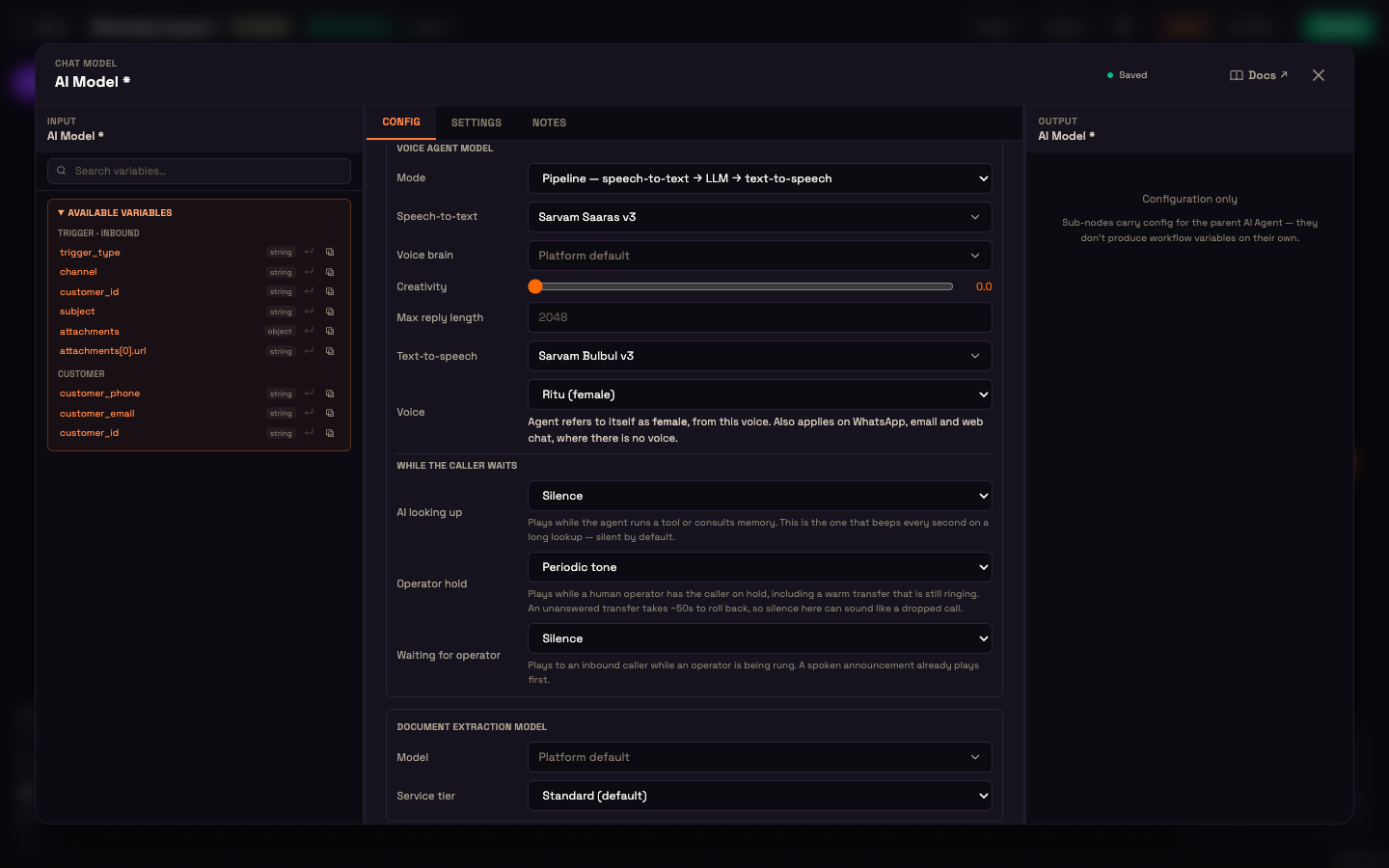
| Pipeline — speech-to-text → LLM → text-to-speech | One model transcribes, a chat model thinks, and a voice model speaks | Indian-language voices, or when you want to choose the brain yourself |
Every model row also offers Platform default, which uses Perfox's recommended model.
Live models and voices
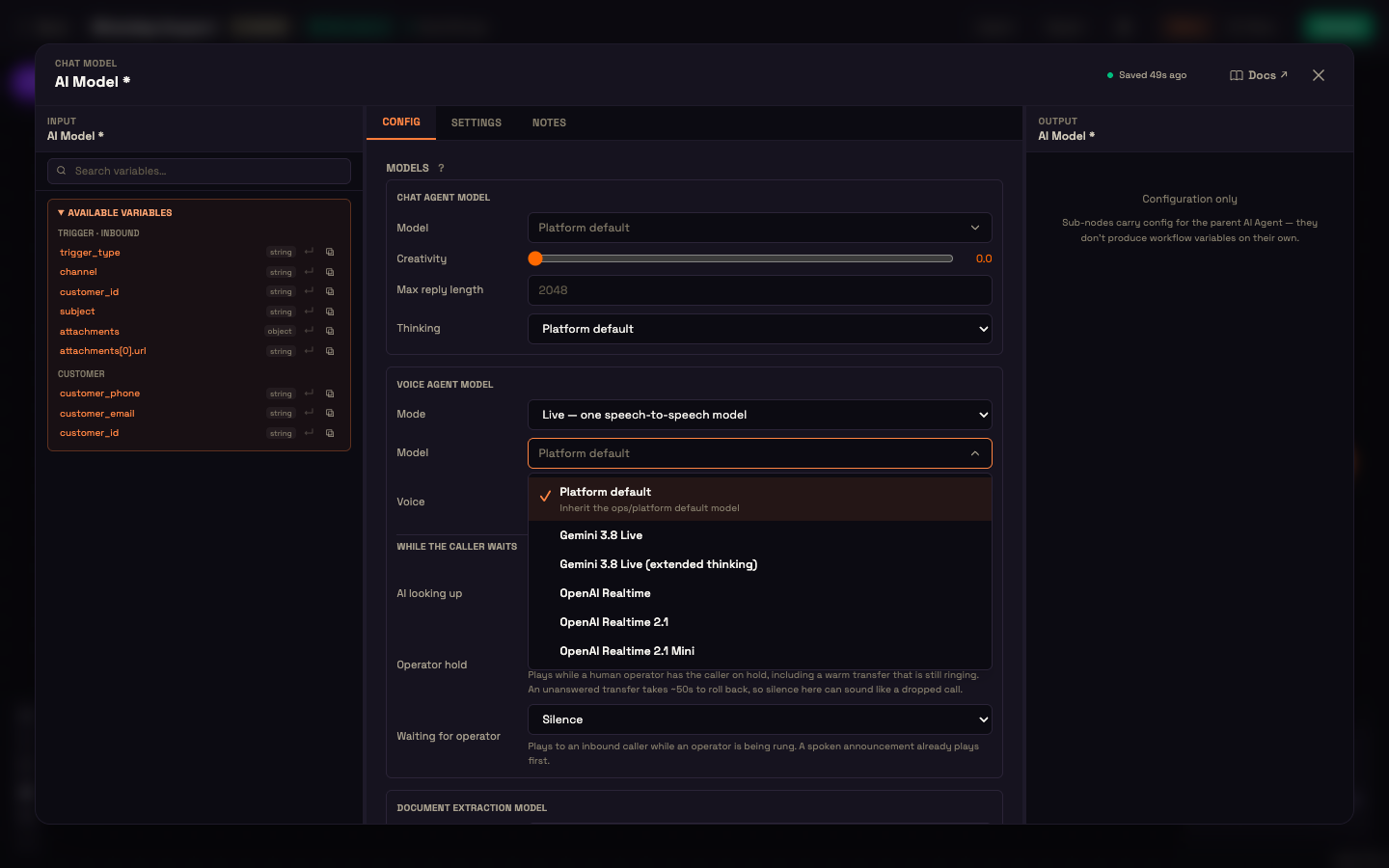
| Model | Voices |
|---|---|
| Gemini 3.8 Live, Gemini 3.8 Live (extended thinking) | 30 Gemini voices. The default is Aoede. The list shows gender where it's known: for example Aoede, Kore, Leda, Despina and Achernar are female, and Charon, Puck, Orus, Fenrir and Zephyr are male |
| OpenAI Realtime, OpenAI Realtime 2.1, OpenAI Realtime 2.1 Mini | alloy, ash, ballad, coral, echo, sage, shimmer, verse, marin, cedar. The default is marin |
Pipeline models and voices
| Step | Options |
|---|---|
| Speech-to-text | Sarvam Saaras v3, Sarvam Saaras v4, or ElevenLabs Scribe v2 Realtime |
| Voice brain | Any chat model: Gemini 3.8 Flash, Gemini 3.7 Flash, Gemini 3.6 Flash, Gemini 3.5 Flash, Gemini 3.5 Flash Lite, Gemini 3.1 Flash Lite, Gemini 2.5 Flash, Gemini 2.5 Flash Lite, GPT-4o, GPT-4o Mini, Sarvam 105B, GPT-OSS 120B (Groq). It also has Creativity and Max reply length settings |
| Text-to-speech | Sarvam Bulbul v3: 37 Indian voices, male (Shubh, Aditya, Rahul, Kabir…) and female (Ritu, Priya, Neha, Kavya…). Sarvam Bulbul v4 Flash: 224 voices, grouped by language across 11 Indian languages (gender is shown where Sarvam states one). ElevenLabs Flash v2.5: Sarah, Laura, Alice, Matilda, Jessica and Bella (female), and George, Roger, Charlie, Callum, Liam, Will, Eric and Harry (male) |
The Voice list only offers voices the selected speaking model actually has, so you can't pick a voice from another vendor by mistake.
A new Pipeline agent starts on Saaras v3 and Bulbul v3. The speech-to-text and text-to-speech lists only offer models that can run live on a call. If you switch between Bulbul v3 and Bulbul v4 Flash, the voice you picked carries over to the same speaker on the other version.
Brand words
Under speech-to-text, Advanced — brand words (collapsed; it shows how many words are set) helps the agent hear your product and brand names correctly. Turn on Use brand words and add the words. Words found in your Knowledge Base are suggested as chips, but only added when you choose them. On every speech-to-text model, a near-miss in the transcript is corrected to your spelling. On Saaras v4, the words are also sent as recognition hints, so they're heard right in the first place.
The agent's gender
The voice you pick also sets how the agent refers to itself, which matters in languages with gendered grammar (Hindi "सकता" vs "सकती"). This carries over to WhatsApp, email and web chat, where there's no voice. A line under the voice confirms it, for example "Agent refers to itself as female, from this voice."
If the voice doesn't tell Perfox a gender (OpenAI voices), or the agent doesn't speak at all, a How the agent refers to itself → Gender control appears instead: Not set, Female, Male or Non-binary.
If you leave the voice on Default, Perfox picks a default voice that matches the gender you set for the agent, on every engine:
| Engine | Female agent | Male agent |
|---|---|---|
| Gemini Live | Aoede | Charon |
| OpenAI Realtime | marin | cedar |
| Sarvam Bulbul v3 | Ritu | Shubh |
| ElevenLabs Flash v2.5 | Sarah | George |
While the caller waits
Under the voice settings, While the caller waits chooses what the caller hears while the agent looks something up. You can pick Off (silence), Periodic tone, or hold music: Music — Calm, Music — Bright or Music — Soft chimes.
| Situation | Default |
|---|---|
| AI looking up (the agent is running a tool) | Off |
The three sounds about a person — Connecting to a person, On hold by an operator and While the team is being rung — are set on the agent's Operator node, under Routing → Waiting sounds. See Operator (Copilot).
On a Pipeline voice, AI looking up also offers Spoken — "One moment, let me check": before a slow lookup the agent says one short line like that in the caller's language, instead of a tone. Live voices show this option as Pipeline voice only.
Caller rules
The same panel sets Caller rules: keypad input, handing off after turns the agent couldn't understand, checking in on a quiet caller and ending the call, an AI disclosure line, and following the caller's language. See Voice → Caller rules.
A call from start to finish
Setup. Asha opens the AI Model sub-node for the Acme support agent and picks Pipeline, with Sarvam Saaras v3 speech-to-text and Sarvam Bulbul v3 text-to-speech. She picks the Ritu (female) voice and sets the Personality to answer in Hindi.
Action. Priya calls and asks, in Hindi, "मेरी रिपोर्ट कब तैयार होगी?" ("When will my report be ready?").
Result. The agent answers in a natural Hindi female voice:
"नमस्ते! आपकी रिपोर्ट कल शाम तक तैयार हो जाएगी। मैं आपको SMS भेज दूँगी।" ("Hello! Your report will be ready by tomorrow evening. I'll send you an SMS.")
Priya starts a follow-up question mid-sentence, and the agent stops talking to listen.
What just happened. Sarvam transcribed Priya's words, the voice brain looked up her report, and Sarvam spoke the reply. Because the voice is female, the agent used "दूँगी" (the feminine form), in speech and in the SMS it sent.
Where to go next
- Voice (Phone and Browser): the voice channels and phone setup.
- AI Model sub-node: the chat, document and vision model settings on the same panel.
- Web Chat: turn on browser voice.