Bring Your Own Provider
Asha runs Acme Support. She already pays for a Plivo number and a business email account, and she doesn't want a second bill or a middle-man on top. With Bring Your Own Provider (BYOP), Perfox uses the accounts she already has. Every call, SMS, WhatsApp message and email her agent sends goes through her own accounts, on her own bills, under her control.
This page is for you as an admin setting up your workspace. By the end you'll know which providers you connect yourself, which ones Perfox runs for you, and how a connected account gets used when a conversation needs it.
What you connect, and what Perfox runs for you
There are two kinds of provider:
| You connect (BYOP) | Included and managed by Perfox |
|---|---|
| The accounts your agent talks through or works with: your phone and messaging provider, your email provider, your file storage for knowledge-base syncs, your databases, and your Google Sheets. | The AI models your agents think and speak with, storage for uploads and call recordings, semantic search for your knowledge base, and web voice in the browser. |
| Connected on Admin → Connections, with your own keys. | Nothing to connect, no keys to paste, and they never appear on the Connections page. |
AI models are included
You don't bring an AI key. The models your agents use are included and managed by Perfox. On each agent's AI Model sub-node you can leave Platform default or pick a specific model, such as a lighter model for speed or a stronger one for complex conversations, and choose voice models for calls. Usage is paid from your workspace credits. See AI Model sub-node.
The Connections page
Go to Admin → Connections. Providers are grouped by what they do, and each one has its own Connect button:
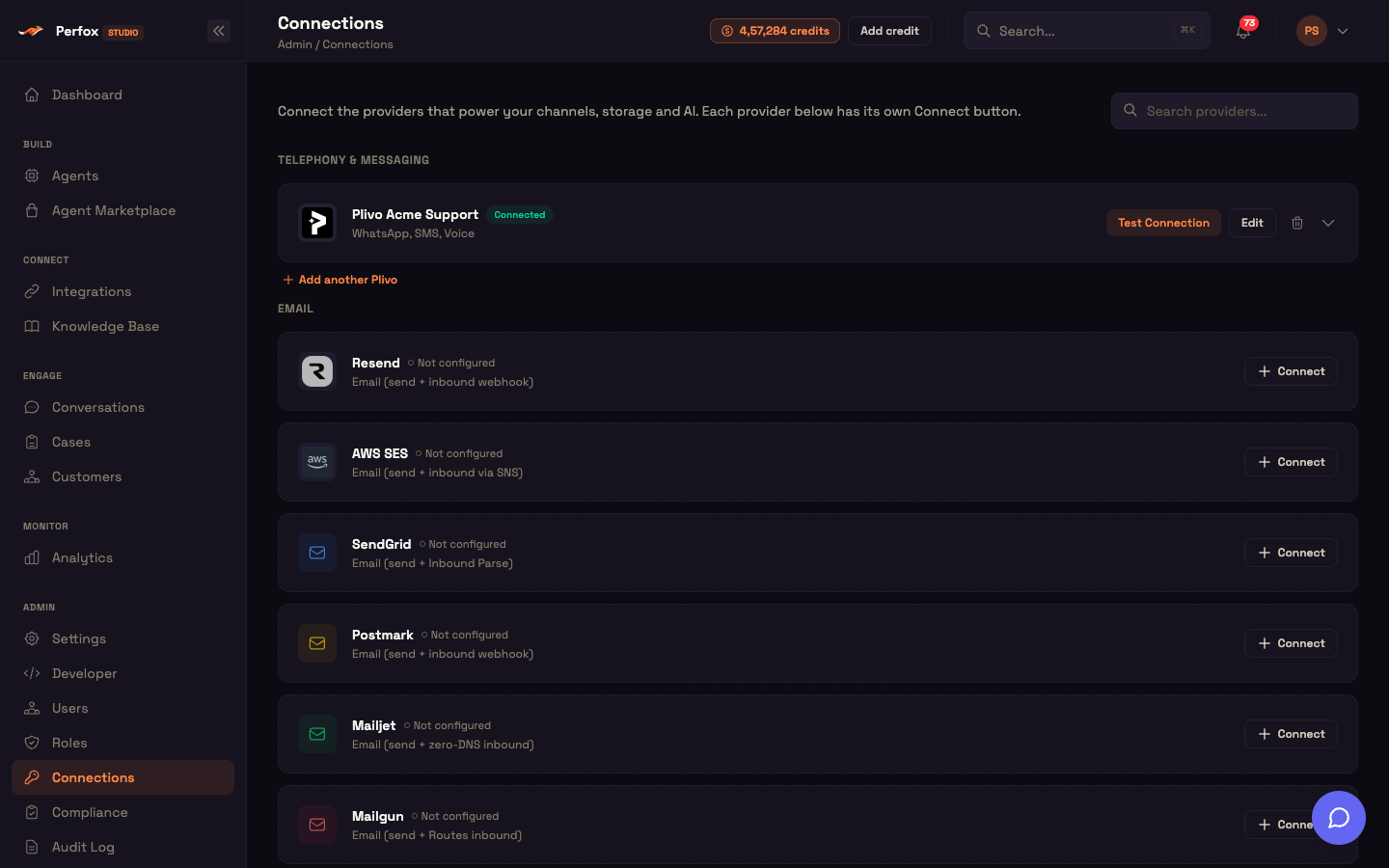
| Category | Providers |
|---|---|
| Telephony & messaging | Plivo, for phone calls, SMS and WhatsApp |
| Resend, AWS SES, SendGrid, Postmark, Mailjet, Mailgun, Gmail / Google Workspace, SMTP / IMAP, and Microsoft 365 (Email) | |
| Storage | AWS S3, Microsoft 365 (OneDrive / SharePoint) and Google Drive, as knowledge-base sources |
| Databases | PostgreSQL, MySQL / MariaDB and MongoDB, for agents that query your live data |
| Integrations | Google Sheets, for agents that append rows (lead capture, for example) |
Each provider asks only for the fields it needs. Once connected, Test Connection confirms it works before your agents rely on it. You can add more than one account of the same provider, for example two Plivo accounts, and pick the right one wherever it's used.
Third-party apps your agent calls as tools (a CRM, a helpdesk, your own server) are connected on Connect → Integrations, not here. See What MCP Is in Perfox.
How a connected account gets used
When your agent needs a provider, for example to send an SMS reply, Perfox uses the account you connected for it at that moment. Nothing is hard-wired, and there's no shared fallback account. Your keys are stored encrypted in your workspace.
If a provider the agent needs isn't connected, or its keys have stopped working, Perfox doesn't fail silently. Studio tells you which connection to fix.
A worked example
Setup. Asha connects her Plivo account on Admin → Connections and clicks Test Connection. It passes. On her agent, she adds an SMS trigger and an SMS Sender whose Send from is her Plivo number.
Action. Priya texts Acme Support: "Has my refund gone through?"
Result. Priya's phone buzzes:
Hi Priya, your refund was issued yesterday and should reach your bank in 3–5 working days.
What just happened. The reply left through Asha's own Plivo account and number, on her own bill. Perfox didn't route it through any shared number.
Changing or removing a connection safely
Before you rotate a provider's keys or delete a connection, expand its card on the Connections page. It shows where the connection is used: each phone, SMS or WhatsApp number with the agent it routes to, and a Detach button. Detaching moves the affected agent back to draft, so you re-publish it once the new connection is in place.
You can now
You can now connect your own provider accounts, know which capabilities Perfox runs for you, and change a connection without guessing who depends on it.
- Connections — the Connections page in detail.
- Provider Setup — per-provider fields and webhook URLs.
- AI Model sub-node — choose models per agent.