Provider Matrix
When you connect a provider, for example your Plivo account so your agent can send SMS, Perfox sends through your account, not a shared one. This page lists every provider you can connect, the fields each one asks for, what Perfox runs for you, and the webhook address each two-way provider needs.
Jump to what you need:
- "Which providers can I connect?" → What you can connect
- "What do I have to set up for AI models, storage or web voice?" → Included and managed by Perfox
- "What URL do I paste into my provider's dashboard?" → Inbound webhook addresses
Bring Your Own Provider
For the services your agents talk through (phone numbers, email accounts, your own storage and databases, Google Sheets) you bring your own account and Perfox uses your keys. Keys are encrypted when saved and stay in your workspace.
If a connection is missing or a required field is blank, the action stops with a message that names the provider to fix. Nothing fails silently. More on this model: Bring Your Own Provider.
What you can connect
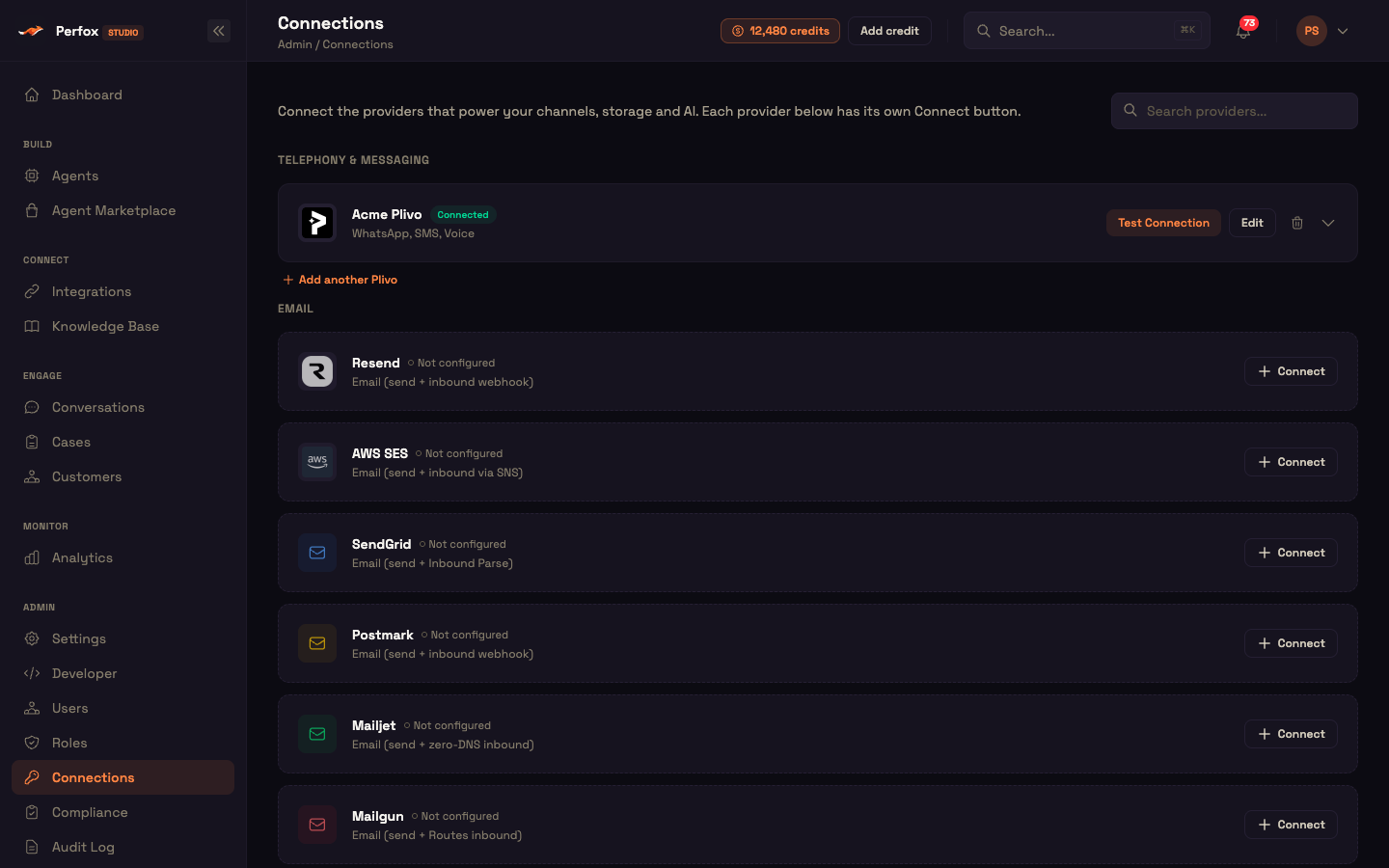
Open Admin → Credentials. The page shows one slot for every provider you can connect, grouped by category, whether or not you've set it up yet:
- Not configured: the slot shows Connect (Connect Google for Google Sheets).
- Connected: each connection gets its own card with Test Connection, Edit, delete and expand, plus Add another <provider> below it.
Connect opens a window for that provider only, titled Connect <provider>, so you can't pick the wrong type by mistake. Full walkthrough: Connections.
Telephony & Messaging
| Provider | What you enter | Guide |
|---|---|---|
| Plivo (WhatsApp, SMS, Voice) | Auth ID and Auth Token. Optional: SIP domain, username and password; India SMS DLT entity ID, template ID and template category; WABA ID for WhatsApp template sync. You tag phone numbers after saving. | Plivo |
Email
Nine providers, all able to send, receive and thread replies:
| Provider | What you enter |
|---|---|
| Resend | API key, from email. Optional inbound signing secret and inbound address. |
| AWS SES | Access key ID, secret access key, region, from email (verified identity). |
| SendGrid | API key, from email. Optional from name, data residency, inbound parse hostname. |
| Postmark | Server API token, from email, message stream. Optional inbound webhook secret. |
| Mailjet | Public API key, secret key, from email. Optional from name, parse route address. |
| Mailgun | Private API key, sending domain, region, from email. Optional webhook signing key. |
| Gmail / Google Workspace | Your own Google app's OAuth client ID and secret, then sign in with Google. |
| SMTP / IMAP | SMTP host, port, username, password and from email for sending; IMAP host, port, username and password for receiving. |
| Microsoft 365 (Email) | Your own Microsoft Entra app's directory ID, application ID and client secret, either app-only (pick a mailbox) or signing in as a user. |
Receiving works differently per provider. AWS SES is the one exception to self-serve receiving: Perfox receives SES email on its own receiving service, and you contact Perfox support to connect your address. See AWS SES and the full comparison in Email Providers.
Storage (knowledge-base sources)
These are your file stores that the Knowledge Base can sync from. They're not where Perfox keeps your files.
| Provider | What you enter |
|---|---|
| AWS S3 | Access key ID, secret access key, region. |
| Microsoft 365 (OneDrive / SharePoint) | Your own Microsoft Entra app, either app-only or signing in as a user. |
| Google Drive | Service account JSON. |
Databases
Your own external databases, which an agent can query through a database action:
| Provider | What you enter |
|---|---|
| PostgreSQL | Host, port (default 5432), database, user, password, SSL mode (disable · require · verify-full), optional SSL CA certificate. |
| MySQL | The same fields, port default 3306. |
| MongoDB | A connection string (mongodb:// or mongodb+srv://), or host, port (27017), database, user, password, auth source (default admin) and TLS. |
Details: Database Connectors.
Integrations
| Provider | What you enter | Guide |
|---|---|---|
| Google Sheets | Your own Google app's client ID and secret, then Save & Connect Google. | Google Sheets |
Only the providers above are offered. Integrations you add from MCP Registry → Popular Integrations are managed there and don't appear on the Credentials page.
Included and managed by Perfox
Some services are part of Perfox itself. You never enter keys for them, and they don't appear on the Credentials page:
| Service | What it does | What you control |
|---|---|---|
| AI models (text and voice) | Your agents' replies, speech recognition and speech, plus built-in features such as knowledge-base indexing, summaries and "Ask AI". | Which model and voice an agent uses, on its Chat Model node. See Chat Model. |
| File storage | Holds uploaded files, knowledge-base documents and call recordings. | How long data is kept, under data retention in Settings. |
| Knowledge-base search | Finds the passages in your Knowledge Base that are relevant to each question. | What you upload and how the agent uses it. See Knowledge Base. |
| Web voice | Carries voice calls started from the chat widget in a browser. | Turning voice on for an agent. Phone calls use your own Plivo numbers instead. |
Usage of these services is paid for from your workspace's prepaid credits. Every new workspace starts with 5,000 free credits.
Inbound webhook addresses
Two-way providers need a Perfox address pasted into the provider's own dashboard so incoming messages and calls reach your workspace. Every address uses your workspace's API address:
text
https://<your-workspace>-api.perfox.aiUse your own workspace name, the one in your Studio address. A request sent to any other address never reaches your agents.
| Channel | Method and path | Notes |
|---|---|---|
| SMS (Plivo): incoming | POST /webhooks/sms/plivo | Plivo Message URL |
| SMS (Plivo): delivery status | POST /webhooks/sms/plivo/status | Plivo Delivery / Status URL |
| WhatsApp (Plivo): incoming | POST /webhooks/whatsapp/plivo | Plivo Inbound message URL |
| WhatsApp (Plivo): delivery reports | POST /webhooks/whatsapp/plivo/status | Plivo Delivery Reports URL |
| Voice (Plivo): incoming calls | POST /plivo/inbound-answer | Plivo Application Answer URL. Configure in Plivo can set this up for you. |
The Plivo editor shows these URLs already filled in for your workspace, each with a Copy button (see Point Plivo at Perfox). For outgoing calls Perfox supplies the answer URL itself, so there's nothing to set in Plivo. Email providers that receive through a webhook show their own inbound settings on their connection (see Email Providers). Every incoming message, whatever the channel, is handled the same way once it arrives (Channels Overview).
What's next
- Connections: step-by-step guide to the Credentials page.
- Plivo · AWS SES · Google Sheets: provider setup guides.
- Email Providers: all nine email providers in depth.
- Database Connectors: PostgreSQL, MySQL and MongoDB.
- Bring Your Own Provider: how your keys stay yours.