HTTP Request Node
Your workflow has what it needs, and now another system has to hear about it: post a booking to your scheduling system, send an extracted invoice to accounts, or fetch today's price list. The HTTP Request node calls an HTTP API at a fixed point in the flow and stores the response for later steps.
You'll find it under Data in the node picker.
Node or action?
This page is about the flow step: it calls the API every time the run reaches it, with the request exactly as you configure it. If you'd rather let the AI Agent decide when to call an API and fill in the details, use the HTTP Request action on the agent's Action port instead.
Settings
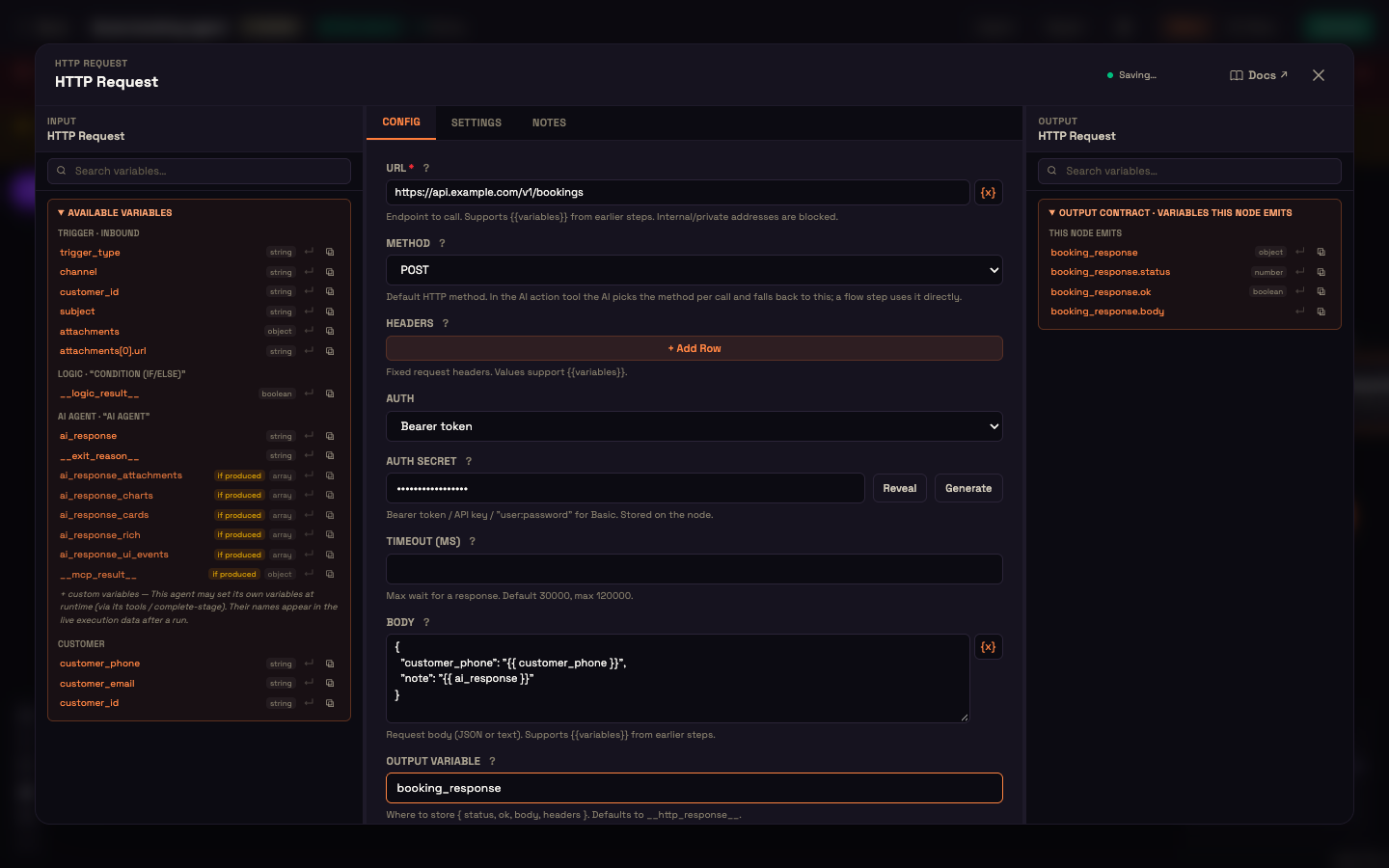
| Setting | What it controls |
|---|---|
| URL | The endpoint to call, for example https://api.example.com/v1/bookings. Click {x} to insert variables such as {{ pincode }}. Internal and private addresses are blocked. |
| Method | GET, POST, PUT, PATCH, DELETE or HEAD. |
| Headers | Click + Add Row for each fixed header. Values accept {{ variables }}. |
| Auth | None, Bearer token, API key (header) or Basic (user:password). |
| API key header | Shown for API key (header): the header to send the key in. Defaults to X-API-Key. |
| Auth secret | Shown for any auth type: the token, key, or user:password. Use Reveal to check it or Generate to create one. It's stored on the node. |
| Timeout (ms) | How long to wait for a response. Defaults to 30000 (30 seconds); the maximum is 120000. |
| Body | Shown for POST, PUT and PATCH: the request body, as JSON or text. Accepts {{ variables }}. |
| Output Variable | Where the response is stored. Defaults to __http_response__. |
Pick the Method explicitly
Choose the Method yourself, even when the one you want is already showing. The Body field only appears once you've picked POST, PUT or PATCH.
Variables in a JSON body
When the Body is valid JSON, Perfox fills in each {{ variable }} and takes care of escaping. A reply that contains line breaks or quotes still produces valid JSON. Wrap the placeholder in quotes, as in "note": "".
What you get back
The response is stored in your Output Variable with four parts:
| Part | Holds |
|---|---|
status | The HTTP status code, for example 200. |
ok | true for a 2xx status. |
body | The response body. JSON responses can be read field by field, for example {{ booking_response.body.booking_id }}. |
headers | The response headers. |
The output panel on the right lists these parts so you can insert them into later steps.
A failed call, whether an error status or no response at all, doesn't stop the run. The response (with its status and any error) is handed to the next step, so an agent or a later step can deal with it.
Worked example: send a booking to Acme's scheduling system
Setup. At the end of her booking flow, Asha adds an HTTP Request with URL https://api.example.com/v1/bookings, Method POST, Auth Bearer token with Acme's key, and this Body:
json
{
  "customer_phone": "{{ customer_phone }}",
  "note": "{{ ai_response }}"
}
She sets Output Variable to booking_response.
Action. Priya confirms her slot. The run reaches the HTTP Request and posts the booking.
Result. Acme's system replies with a booking id, which later steps read as {{ booking_response.body.booking_id }}.
What just happened. The call ran at exactly that point in the flow, with the request Asha configured. No model decided whether to make it.
Keep a Knowledge Base fresh from a feed
A common pattern is Schedule trigger → HTTP Request (GET a feed) → KB Index, which re-indexes an external catalog on a timetable. See KB Index.
Next steps
- KB Index: index the response into a Knowledge Base folder.
- Document Processing: extract data from a file before sending it on.
- Integrations actions: let the agent call an API itself.