Agent Memory
Priya chatted with Acme Support last Tuesday about a delayed order and mentioned she prefers email over calls. Today she opens the chat again and asks, "Any news?" A good agent doesn't make her start over. It remembers who she is, what she told it, and what the last conversation was about.
This page is for admins deciding how much their agent should remember. By the end you'll know what the agent remembers, where you switch each kind of memory on or off, and what you can see and clear for a customer in the Studio.
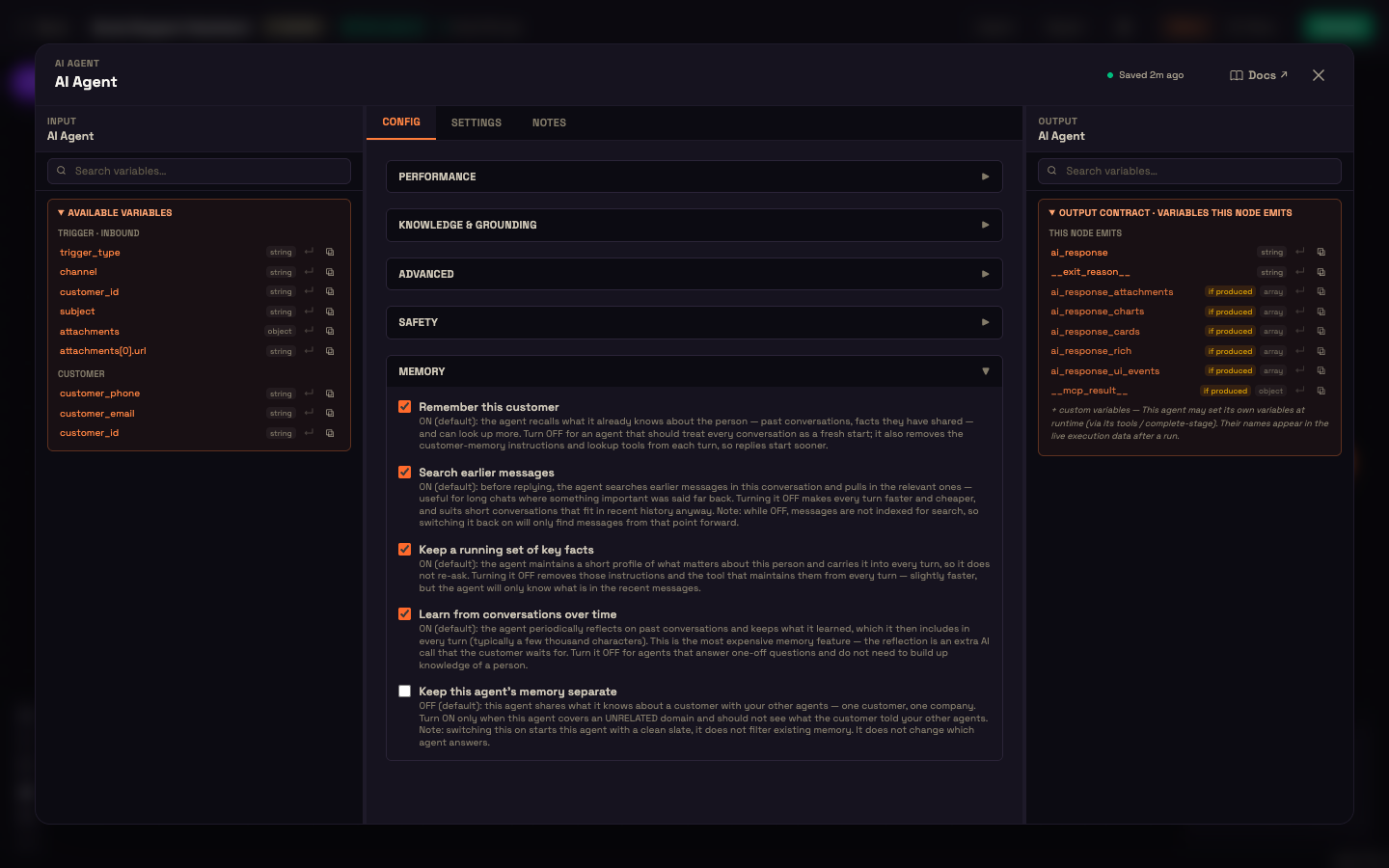
Memory is built in, and on by default
You don't add a memory node or connect a memory provider. Every AI Agent remembers by default. You'll find the controls on the AI Agent node itself: open the node, stay on the Config tab, and expand the Memory section.
The section has five switches.
| Switch | Default | What it does |
|---|---|---|
| Remember this customer | On | The agent recalls what it already knows about the person, including past conversations and facts they've shared, and can look up more. Turn it off for an agent that should treat every conversation as a fresh start. Replies also start a little sooner. |
| Search earlier messages | On | Before replying, the agent searches earlier messages in the conversation and pulls in the relevant ones. This helps in long chats where something important was said a while back. While it's off, new messages aren't indexed for search, so switching it back on only finds messages from that point forward. |
| Keep a running set of key facts | On | The agent keeps a short profile of what matters about this person, such as their name, preferences or the order they're asking about, and carries it into every turn so it doesn't ask again. |
| Learn from conversations over time | On | The agent regularly reflects on past conversations and keeps what it learned. This is the most expensive memory feature, because each reflection is an extra AI call the customer waits for. Turn it off for agents that answer one-off questions. |
| Keep this agent's memory separate | Off | By default, what one agent learns about a customer is shared with your other agents: one customer, one company. Turn it on only for an agent that covers an unrelated area and shouldn't see what the customer told your other agents. Switching it on gives this agent a clean slate. It doesn't filter existing memory, and it doesn't change which agent answers. |
Every switch you turn off makes each reply a little faster and cheaper, because the agent has less to read and fewer steps to take. The Speed vs accuracy preset at the top of the same panel changes several of these switches in one click. Fastest trims memory, and Balanced keeps it all on.
Memory follows the customer, not the channel
The agent remembers a customer, not a chat window. Perfox recognises the same person across web chat, SMS, WhatsApp, email and phone by their phone number, email or WhatsApp identity (see Channels Overview). So what Priya said on your website yesterday is still there when she messages your WhatsApp number today.
A visitor who never identifies themselves (an anonymous website visitor, for example) has nothing to connect across visits. The agent still remembers the current conversation, but each new anonymous visit starts fresh. When you test in the Web Chat Live preview, fill in Test as with a phone number, email or external ID to try memory as an identified customer.
What you can see and clear for a customer
Open Engage → Customers and select a customer. The Profile tab has two memory cards.
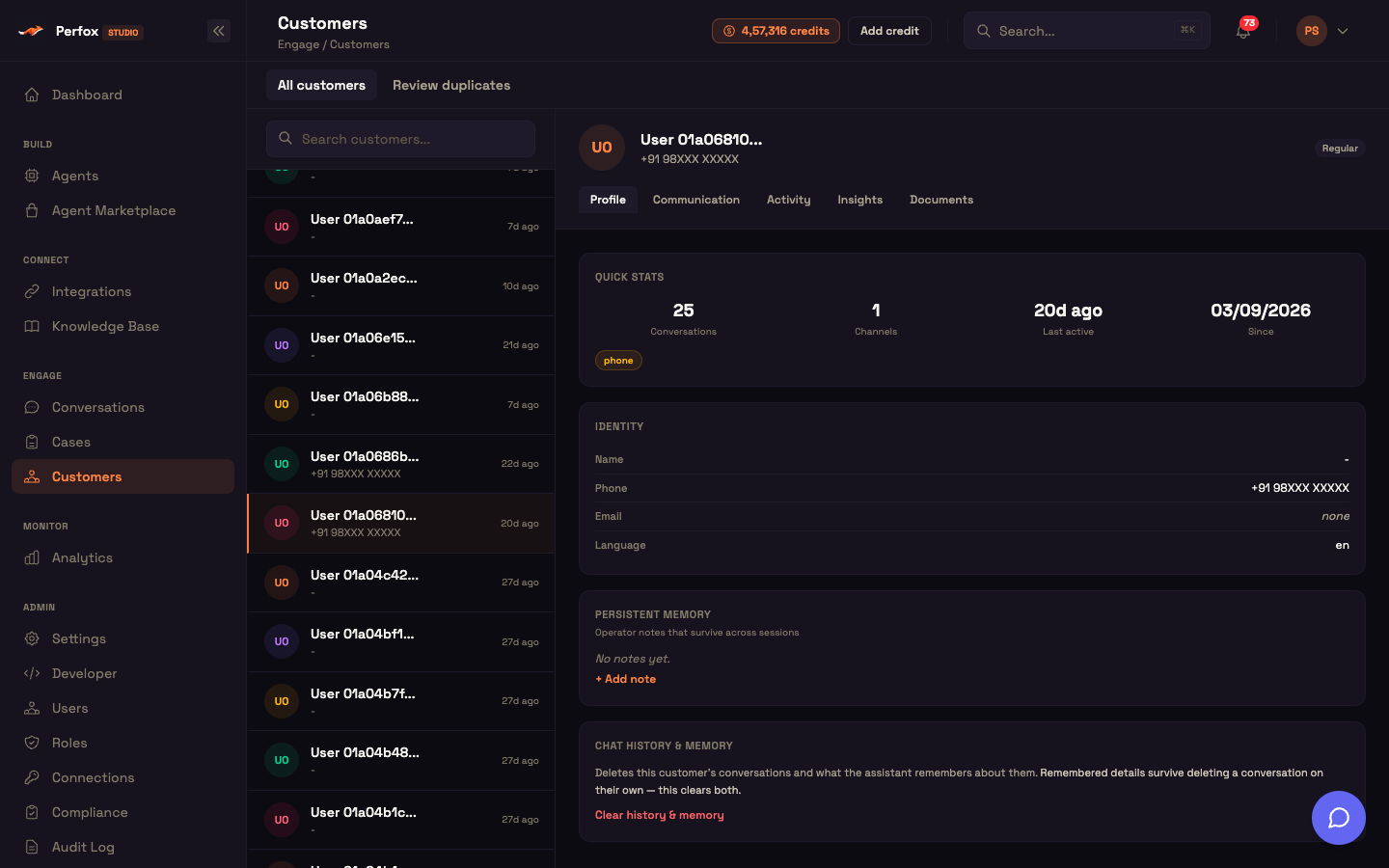
- Persistent memory. Notes your team keeps about the customer that last across sessions. Click + Add note to record something like a preferred contact time, and remove a note when it's no longer true.
- Chat history & memory. Clear history & memory deletes this customer's conversations and what the assistant remembers about them. Deleting a conversation on its own does not erase remembered details. Use this card when a customer asks you to forget them, or when you want a returning test customer to start completely fresh.
Facts about your business belong in your own systems
Agent memory is about the conversation: who the person is, what they said, what they want. Facts your business already keeps, such as order status, balances, bookings or test results, should come from your own systems through your tools (see Agents and MCP). Your systems are always up to date. A copy remembered from last week may not be.
A day at Acme Support
Setup. Asha, an admin at Acme Support, leaves all the memory switches at their defaults on her support agent.
Action. On Tuesday, Priya writes on the website chat:
Priya: My order still hasn't arrived. Please email me, not call. I'm at work all day.
Agent: Sorry about that, Priya. I've asked the team to check, and we'll update you by email.
On Thursday she messages Acme's WhatsApp number from the phone number she gave on Tuesday:
Priya: Any news?
Agent: Hi Priya. About the delayed order you asked about on Tuesday: it left our warehouse this morning. I'll send the tracking link to your email as you prefer.
What just happened. Perfox matched Priya's WhatsApp number to the customer from Tuesday's chat, so the agent carried over what she had said: the open order question and her preference for email. The order status itself came live from Acme's order tool, not from memory. Asha didn't build anything special for this. Memory was on by default.
See also
- AI Agent Node — every section of the AI Agent panel, including Memory.
- Channels Overview — how one customer is recognised across channels.
- Customers — the customer directory and profile tabs.
- Knowledge Base & RAG — answering from your documents, a different job from remembering a person.