AWS SES (Email)
Asha wants Acme Support's AI replies to go out from the company's own domain and be billed to its own AWS account. Connecting AWS SES does that. This page covers what you enter, what Perfox handles, and how SES differs from the other email providers.
If you haven't connected a provider before, read Bring Your Own Provider first. It takes about two minutes.
Sending vs receiving
AWS SES handles the two directions of email differently:
- Sending is self-serve. You connect your own SES account on the Credentials page, and every AI reply goes out from your verified address, billed to your AWS account.
- Receiving is not self-serve. Perfox receives SES email on its own receiving service and routes each message to a workspace by the address it was sent to. There is no webhook for you to paste, and no receipt rule or storage bucket to set up. As the note on the SES card says, you ask for your receiving address to be connected. For Perfox, that means contacting Perfox support.
If you want to set up receiving yourself, pick one of the other email providers (Resend, SendGrid, Postmark, Mailjet, Mailgun, Gmail / Google Workspace, SMTP / IMAP or Microsoft 365). Each of them can receive through your own account. See Email Providers.
Connect AWS SES
- Open Admin → Credentials. AWS SES is under Email.
- Click Connect. The Connect AWS SES window opens.
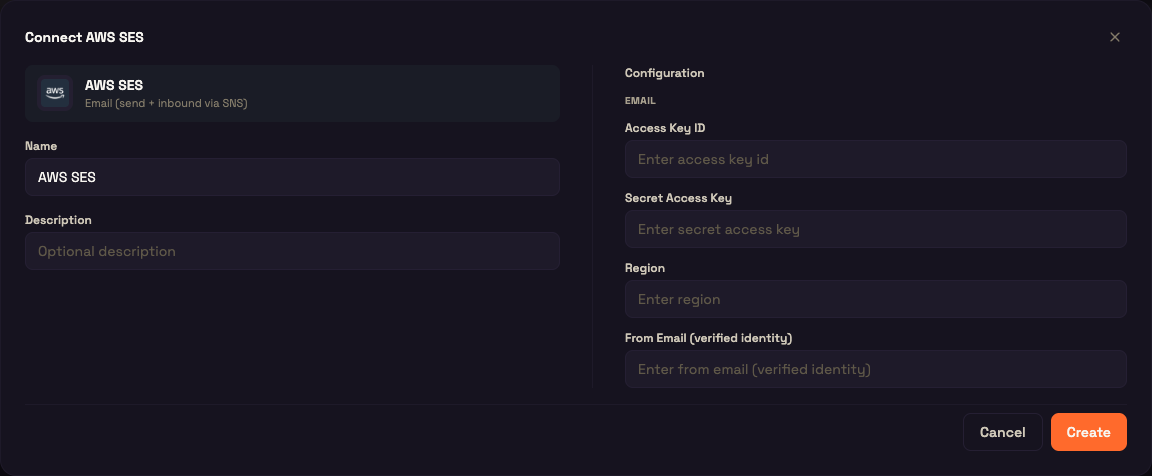
- Fill in the fields and click Create.
| Field | Required | What it is |
|---|---|---|
| Name / Description | Name only | A label for this connection. |
| Access Key ID | ✅ | The access key of an IAM user allowed to send through SES. |
| Secret Access Key | ✅ | The matching secret. It's encrypted when saved. |
| Region | ✅ | The SES region, for example ap-south-1. It must be the region where your sender identity is verified. |
| From Email (verified identity) | ✅ | The address replies are sent from. It must be a verified SES identity (a domain or a single address) in that region. |
All four configuration fields are required. If one is missing, a send stops and asks you to finish configuring the provider, so nothing is sent from a half-set-up account.
Before you connect, make sure that in AWS:
- the From Email, or its domain, is verified in SES in your chosen region. SES refuses to send from an unverified identity;
- the IAM user has permission to send raw email (
ses:SendRawEmail), which Perfox uses for threaded replies; - your SES account is out of the SES sandbox if you'll email people whose addresses you haven't verified.
After saving, click Test Connection on the card to check that your keys work.
How replies are sent
- From address. Replies come from the From Email on the connection.
- Threading. When an agent replies to an email, Perfox adds the standard reply headers (
In-Reply-ToandReferences) so the reply sits under the customer's original message in their inbox. Later replies in the same conversation continue the same thread without any setup. - Subject. The subject is kept separate from the message body, so an AI reply never starts with a stray
Subject:line. - Plain text and HTML. Every email includes a plain-text body, plus an HTML version when the reply has rich content.
- Failures. A failed send is reported as an error, not dropped silently.
An agent sends email only when you add an email sender action to it. See Email Channel.
How received email reaches your agent
Once Perfox support has connected your receiving address, email to that address is received by Perfox, checked, and passed to your workspace:
What Perfox takes from each message:
| Part | Where it comes from |
|---|---|
| Sender | The original From: line of the email, not the delivery envelope. Forwarding services such as Office 365 and Gmail rewrite the envelope, so relying on it would create a new customer for every forwarded email. |
| Recipient | The To: address. Your Email trigger uses it to pick the agent. |
| Subject | Kept alongside the message, not added to the body. |
| Message ID | Used to thread the agent's reply under the original email. |
| Body | The plain-text part of the email. If it's empty, the message reads [Email received from <sender>]. |
Automated mail is never answered
Replying to an auto-reply can start an endless mail loop, so Perfox drops mail that looks machine-generated before any agent sees it. This check applies to email from every email provider, not only SES. A message is dropped when it has any of these signs:
| Sign | Example |
|---|---|
| Empty return path | Bounces and delivery-failure notices |
Auto-Submitted: starting with auto- | auto-replied, auto-generated |
Precedence: of bulk, junk, list or auto_reply | Bulk and list mail |
X-Autoreply: yes or an X-Autorespond: header | Out-of-office replies |
List-Id: or List-Unsubscribe: | Mailing lists and newsletters |
Normal person-to-person email passes straight through.
Where SES sits among the email providers
Perfox supports nine email providers. All nine can send, receive and thread replies. The difference with SES is who sets up receiving:
| AWS SES | The other eight | |
|---|---|---|
| Sending | Your SES account | Your own account with that provider |
| Receiving | Perfox's receiving service. Contact Perfox support to connect your address. | Set up yourself, through your own account |
| Threaded replies | Yes | Yes |
The full comparison is in Email Providers.
Worked example: Acme Support replies from its own domain
Setup. Asha verifies acmesupport.com in SES in ap-south-1 and creates an IAM user that can send raw email.
Action.
- In Admin → Credentials → Email → AWS SES, she clicks Connect, enters the keys, the region
ap-south-1andsupport@acmesupport.comas the From Email, then clicks Create and Test Connection. - She contacts Perfox support to have
support@acmesupport.comconnected for receiving. - She publishes an agent with an Email trigger watching
support@acmesupport.comand an email sender action.
Result. Priya emails support@acmesupport.com. Her message appears as a new email conversation in Asha's workspace, and the agent's reply arrives in Priya's inbox from support@acmesupport.com, nested under her original email. When she answers, the conversation carries on in the same thread.
Troubleshooting
| Symptom | Likely cause |
|---|---|
| A send asks you to configure the provider | The SES connection is missing, or one of Access Key ID, Secret Access Key, Region or From Email is empty. |
| Email address not verified | The From Email isn't a verified SES identity in that region. |
| Sends fail for some recipients only | Your SES account is still in the sandbox, which only allows verified recipients. |
| Received email never shows up | Your receiving address hasn't been connected yet (contact Perfox support), or no published agent has an Email trigger on that address. |
| Email arrives but the agent doesn't reply | The email looked automated and was dropped (see the table above), or the agent has no email sender action. |
| Replies don't thread | The reply was sent outside the original conversation, so there was no message to reply to. |
See also
- Email Channel: Email triggers, sender actions and how agents answer email.
- Email Providers: all nine providers, their fields and how each receives mail.
- Connections: managing every provider connection.
- Bring Your Own Provider: how your provider keys stay yours.