Agents and MCP
A customer asks your agent to reschedule a delivery. Two different jobs happen in that moment. Something has to hold the conversation and sound like your brand, and something has to actually move the delivery in your system. In Perfox these are two separate layers. The agent talks and decides what happens next. Your MCP tools do the real work against your data. By the end of this page you'll know where each job lives, why the split matters, and the one rule Perfox checks when you publish.
This page is for admins like Asha who are building an agent and want to put each piece of logic in the right place. If you're new to the canvas, start with Canvas Basics.
Two layers, one boundary
| Layer | Job | Where it lives |
|---|---|---|
| Agent | Orchestration and conversation. It's the graph you build on the canvas: triggers, the AI Agent node and its sub-nodes, senders, Condition (IF/ELSE), Human Handoff and other steps. It decides who, when, on which channel, and how the conversation sounds. | The canvas at Build → Agents. See Canvas Basics. |
| MCP server | Business logic: every action that touches your data (look up, book, charge, validate, decide), and the records themselves. | Your own server, connected on Connect → Integrations. See Building Your Own MCP Server. |
The AI Agent node at the centre of the canvas is the conversation engine inside the agent, not a separate layer. Its ports along the bottom edge (Personality, AI Model, Integration, Knowledge, Action, Operator and Steps) are where you attach what it needs. You connect an MCP server on the Integration port and choose which of its tools the agent may use.
One engine for every surface
Every conversation in your workspace runs on the same agent engine, whether it comes from a channel or runs as a step inside a larger flow, so behaviour stays consistent everywhere. The agent calls your tools with the model's native tool calling, reads each result, and decides what to do next. It can take several steps in one turn before it replies, up to the Max steps per turn you set on the AI Agent node (20 by default). Every turn also passes through the safety checks you've set.
Because the engine is the same everywhere, changing the personality, a tool or a trigger changes exactly one part of the behaviour. The same kind of graph can serve a diagnostics lab and a bank with no business wording leaking between them.
The rule Perfox checks: Condition nodes branch on metadata, not business data
A Condition (IF/ELSE) node may only branch on conversation metadata, never on a raw business value. The values you can use are:
exit_reason: how the previous stage endedchannel: which channel the conversation is on (web, SMS, email, WhatsApp, phone)trigger_type: what started the agentmcp_result: a decision returned by one of your MCP tools
You can combine them with == != > < >= <= && ||.
Branching directly on a business field, such as amount > 50000 or status == 'pending', is blocked. Instead, an MCP tool returns the decision, and the Condition node branches on it:
Perfox checks this rule when you validate or publish, and again when the agent runs. An agent the canvas marks red can't go live. This keeps your business rules in one place, your own code, instead of spread across the canvas.
What the agent knows
Three sources of knowledge sit alongside the agent. None of them makes business decisions.
- Your tools (MCP). Live answers from your own systems: order status, balances, availability. These are always the most current source.
- Knowledge Base. Your documents, searched on every turn or on demand. For OneDrive, SharePoint and Google Drive sources you can search the files where they live instead of copying them in. See Knowledge Base & RAG.
- Memory. What the agent remembers about the person across conversations: facts they've shared, preferences, earlier chats. You control it in the AI Agent's Memory section. See Agent Memory.
Worked example
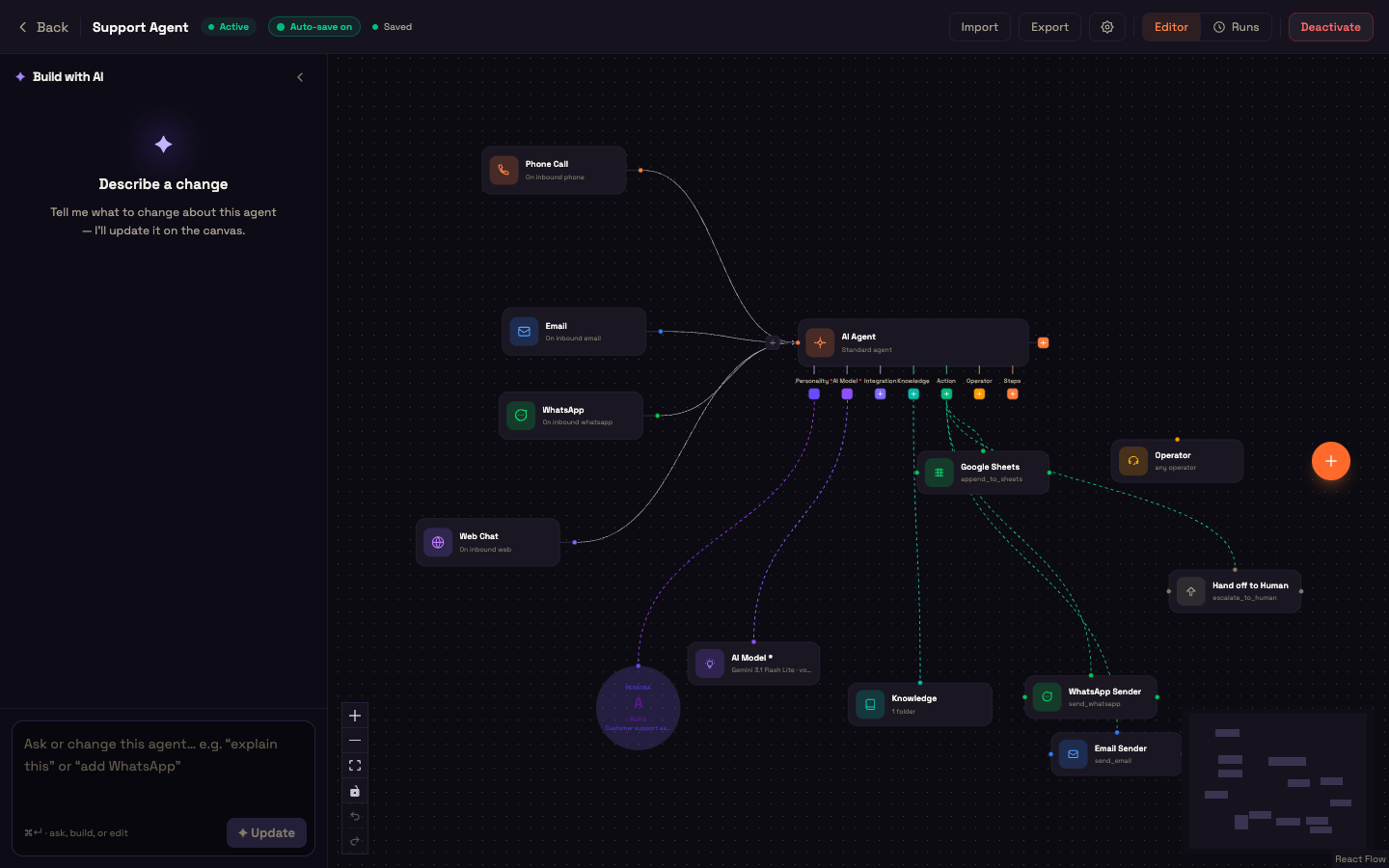
Setup. Asha, an admin at Acme Support, connects Acme's own order system as an Integration and attaches it to the AI Agent's Integration port. The server offers a reschedule_delivery tool that checks the slot and moves it. She adds a WhatsApp trigger and a WhatsApp Sender on the Action port so the agent can reply.
Action. Priya writes on WhatsApp: "Can you deliver my order on Saturday instead?"
Result. The AI Agent holds the conversation in Acme's voice and calls reschedule_delivery. The tool checks Saturday's availability in Acme's system, moves the delivery and returns the outcome. The agent replies:
Done, Priya. Your order is now due on Saturday between 10 AM and 1 PM. Reply CHANGE if you need another day.
What just happened. The agent never decided whether Saturday was available. Acme's tool owned that rule and returned the answer. The agent only ran the conversation and chose the words. Because the layers are separate, each one changes on its own: a new personality changes the voice, a new tool version changes the business behaviour, and a new trigger changes the entry point.
You can now …
You can tell orchestration apart from business logic, and you know the rule Perfox enforces: Condition nodes branch on metadata, and business rules live in your MCP tools.
- AI Agent Node — the conversation engine and every section of its panel.
- Condition (IF/ELSE) Node — the branching rules in full.
- Building Your Own MCP Server — build the business-logic layer.
- What MCP Is in Perfox — how MCP fits the wider picture.
- Design Principles — why the boundary is enforced this way.