Retrieval & RAG
When Priya asks Acme Diagnostics' support agent "what does my ferritin result mean?", the agent looks up the passages in Acme's own documents that answer it before writing a word — so the reply is grounded in what Acme uploaded, not a guess. This page explains how that lookup works and which settings let you trade speed and cost for answer quality.
Read the Knowledge Base Overview first if you haven't set up folders yet.
How the agent finds the right passages
When your agent needs knowledge, it searches the folders attached to it and picks the best-matching passages:
- Meaning and exact words, together. Every search matches by meaning — so "what not to eat before the test" finds a passage about "fasting requirements" — and by exact words at the same time, so part numbers, codes, names and rare terms aren't missed. The two sets of results are combined into one ranking, and passages that score well on both rise to the top.
- One search across all attached folders. The best passages win wherever they come from, rather than a few from each file.
- Only current versions. Superseded versions of a versioned document are left out.
- Only what this conversation may see. Shared documents, plus the current customer's own documents — never another customer's. A conversation with no identified customer sees shared documents only.
- With their source. Each passage carries the name of the file it came from, so the agent can say where an answer came from.
Your documents are prepared for this when they're indexed, so a normal search needs no extra AI step at question time.
When the knowledge base is searched
On the AI Agent node, under Knowledge & Grounding, the Knowledge lookup setting decides when the search happens:
| Option | Behaviour | Best for |
|---|---|---|
| Always attach (default) | The knowledge base is searched before every reply and the best passages are added to what the agent reads. | Agents whose answers almost always depend on your documents. Most reliable, but every turn — even "hi" — costs a search and several thousand tokens. |
| On demand | The agent searches only when it decides it needs to. | Agents where many turns need no knowledge. Faster and cheaper on those turns; turns that do need it take one extra step. |
With Always attach you can also set:
- Passages to attach — how many passages (1–30, default 12). More passages means better recall and a larger prompt on every turn.
- Only attach when relevance is at least — 0 to 1 (default 0, which always attaches). If the best passage scores below it, nothing is attached — handy so a greeting doesn't pull in unrelated passages. The agent can still search on its own.
Either way, the agent also has knowledge-search tools it can call mid-conversation — for example to dig deeper into one folder — and those searches follow the same rules above.
Advanced retrieval — four opt-in quality levers
Each Knowledge sub-node has an Advanced retrieval section with four checkboxes, all off by default. Leave them off for the fastest, cheapest search. Turn them on where answer quality matters more than speed — each one adds an AI call to every turn that searches.
| Section | Option | What it does | Use it when |
|---|---|---|---|
| Understand the question | Search reworded variations | Rewrites the question a few ways, searches each and merges the results. | Your documents word things differently from how customers ask. |
| Search by a drafted answer | Drafts a likely answer and searches with that, since stored passages look like answers. The draft is never shown. | Questions are short or vague. | |
| Split multi-part questions | Breaks a compound question into parts and searches each. | Customers ask several things at once ("compare X and Y and list the steps for Z"). | |
| Refine the results | Re-rank the best matches | Pulls a larger set of candidates (about 20), then has AI re-order them by true relevance and keep the best few. | Your knowledge base is large or noisy and near-misses creep in. |
The first three find more of the right passages; re-ranking keeps only the best. They combine well: turn on one or more of the first three, plus Re-rank. If an agent has several Knowledge sub-nodes, an option switched on in any of them applies to the whole search. If one of these steps fails, the search simply carries on without it.
Worked example. Acme Support's policy documents use headings like "Post-60-Day Return Policy", but customers ask "can I return something after three months?". Asha turns on Search reworded variations and Re-rank the best matches on the agent's Knowledge sub-node. Now the question is also searched as "90-day return policy", the matching section is found, and re-ranking puts it first. Each reply that searches makes two extra AI calls — worth it for this agent, and visible in the run's cost breakdown.
Scoping to folders
The agent searches only the folders ticked on its Knowledge sub-nodes (and their sub-folders), never your whole Knowledge Base unless you tick Root. Folders are live: files added later are searched on the next message. Folders from a connector that searches in place are still searched even though they hold no files locally.
Live-searched connectors
Google Drive and OneDrive connectors can be set to search in place instead of downloading and indexing:
| Mode | How it's searched | Trade-off |
|---|---|---|
| Download & index (default) | Like any other file in your Knowledge Base. | Best recall; indexing costs credits and a copy is stored. |
| Microsoft 365 native search | Searched live in Microsoft 365 when a question comes in, limited to the connector's folders. | No indexing cost; files never leave Microsoft 365. |
| Google Drive native search | Searched live in Google Drive when a question comes in. | No indexing cost; keyword matching only, so it finds less than indexing. Requires the Google Drive integration on the agent. |
Live-searched folders are searched alongside your indexed files in the same turn. Setup is in Connectors.
Freshness
Recent search results are reused for a short time when the same question comes up again, to save cost and time. As soon as a file finishes re-indexing, anything cached from it is dropped, so a newly uploaded version is used on the very next question.
Test Knowledge Search
Test Knowledge Search, at the bottom of Connect → Knowledge Base, shows what a question retrieves without wiring an agent.
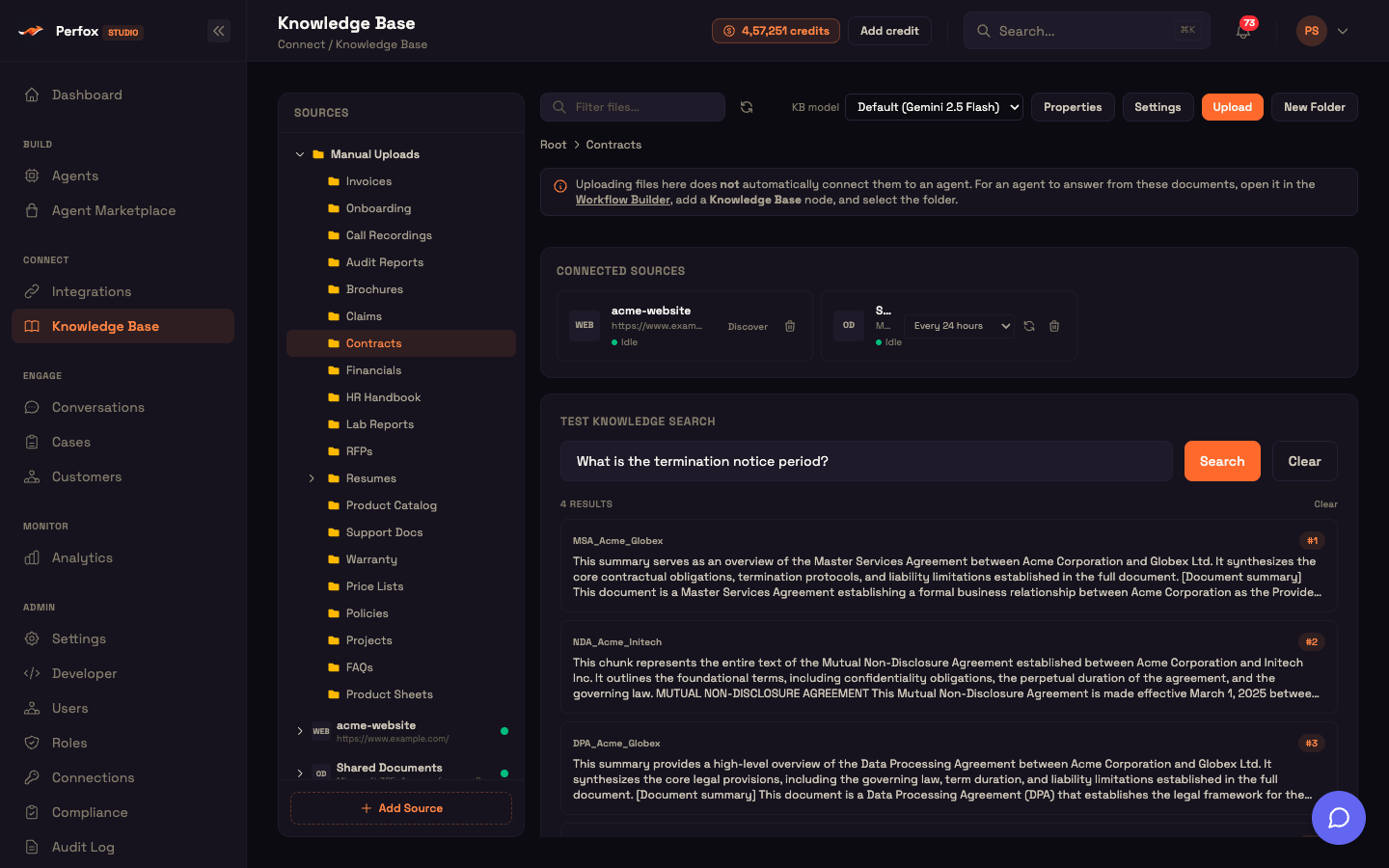
- Type a question and click Search to see the top five passages, each with its file name.
- It searches the selected folder and its sub-folders, or the whole Knowledge Base at Root. Live-searched connectors are searched in the source, as the agent would.
- Results are labelled by rank (#1, #2…) rather than a score, because the combined ranking isn't a percentage.
- Clear resets the box.
It is a good way to check that a new document is being found — and which folders to attach to an agent.
Reference
| Setting | Where | Default |
|---|---|---|
| Knowledge lookup | AI Agent node → Knowledge & Grounding | Always attach |
| Passages to attach | Knowledge lookup (Always attach) | 12 (1–30) |
| Only attach when relevance is at least | Knowledge lookup (Always attach) | 0 (always attach) |
| Search reworded variations | Knowledge sub-node → Advanced retrieval | Off |
| Search by a drafted answer | Knowledge sub-node → Advanced retrieval | Off |
| Split multi-part questions | Knowledge sub-node → Advanced retrieval | Off |
| Re-rank the best matches | Knowledge sub-node → Advanced retrieval | Off |
| Test search results | Knowledge Base page | Top 5 |
See also
- Knowledge Base in the Agent — attach folders and set these options on the canvas.
- Knowledge sub-node — the sub-node's full reference.
- Extraction & Understanding — use cases that add filtering and whole-document reading.
- Connectors — set up search-in-place connectors.
- Knowledge Base & RAG (concept) — the big picture.