Contact Center overview
Your AI agent answers most conversations on its own. Some customers need a person: a complaint that needs judgement, a refund outside policy, or a caller who simply asks for someone. The contact center lets the AI hand a live call or a chat to your team without dropping the customer, lets your team hand it back when they're done, and lets a team lead watch and step in.
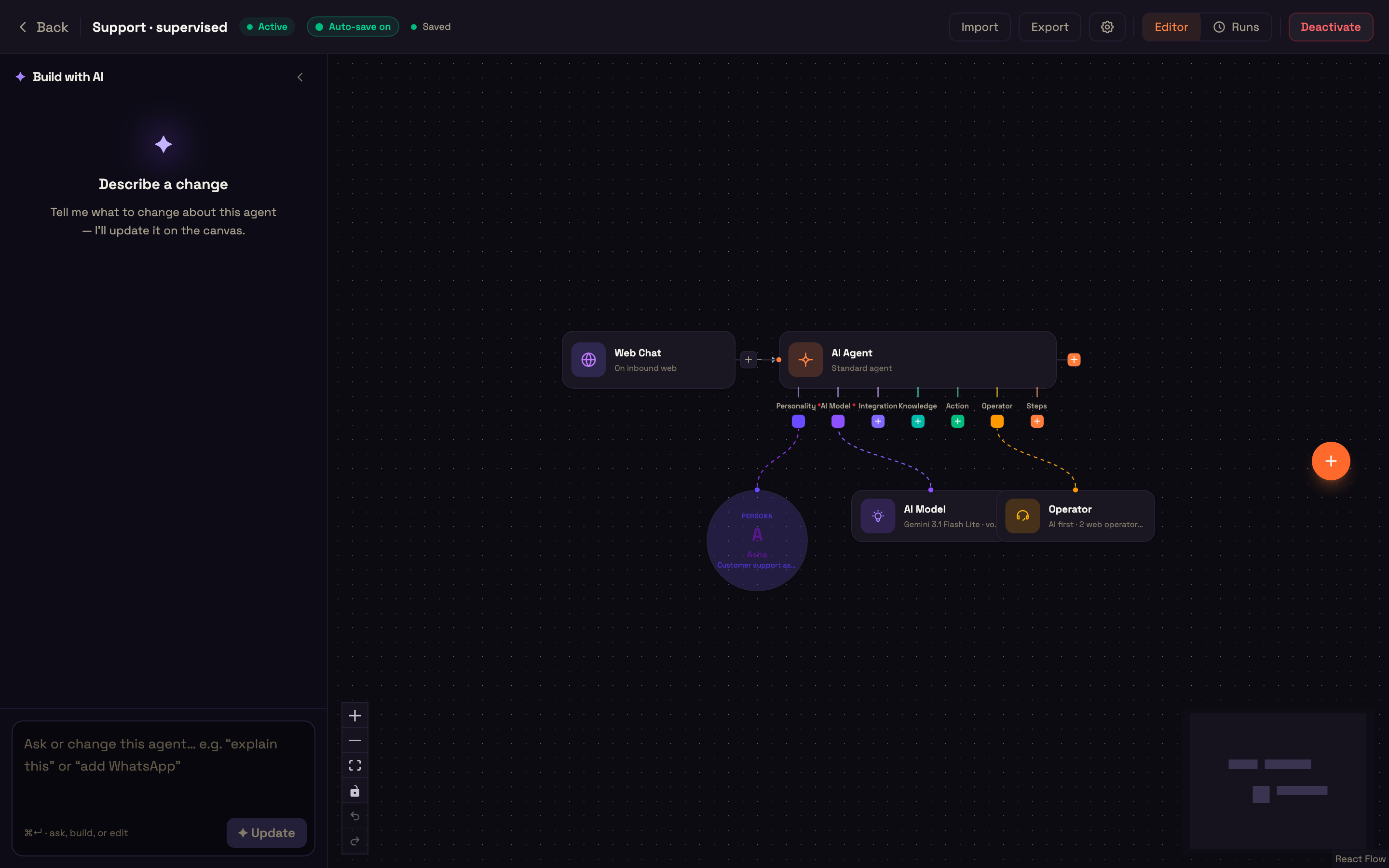
Everything is set in one place: the agent's Operator node. This section explains the idea, walks through the setup, and has 16 worked use cases, each with the exact configuration and what you should see.
Who can be on a conversation
| Party | Who it is |
|---|---|
| AI | Your AI agent. |
| Web operator | A person on your team who answers in Studio's Engage → Conversations (or in your own app with the operator SDK). |
| Phone operator | A person Perfox dials on their phone number, such as a specialist on their mobile, and joins into the call. |
| AI operator | Another of your AI agents that can take over a voice call, such as a "support desk" agent. |
| Supervisor | A team lead listed on the agent who can listen in, coach, or take over from the Live board. |
Web operators, phone operators and AI operators are the three kinds of hand-off target. You list them on the Operator node's Team tab; nobody else is ever rung.
Only one party has the floor at a time. Whoever has the floor is the one talking to the customer. When a person joins, the AI goes quiet but keeps listening. When the person hands back, the AI takes the floor again, is told what happened while it was away, and carries on.
The conversation keeps one recording and one transcript across every change of hands. A hand-off never sends the call out of Perfox: even a phone number is dialled in as a phone operator, so the call stays recorded and transcribed.
What it can do
- Hand off a voice call (web voice or phone) to a web operator, with waiting music instead of silence while they're rung.
- Hand off a chat, WhatsApp, SMS or email conversation: an operator takes over, replies, and hands back.
- Ring a phone operator on their mobile; they hear a short brief on why the customer wants a person, then join the call.
- Pass a call to an AI operator, another of your agents, with its own persona, tools, voice and caller rules (such as its keypad menu), without dropping the caller.
- Let your team answer phone calls first, with the AI assisting, and the AI answering only when nobody is online.
- Route by skill and language, ring one at a time or everyone at once, queue callers when everyone is busy, and take a voicemail when nobody can answer.
- Supervise: listen in, whisper to the operator, or take over a call from the AI or from an operator.
- Help the operator: Copilot suggests answers from the agent's own knowledge and tools while the operator talks.
- Close the loop: a wrap-up with a disposition after every call, a Who handled it timeline, and contact-center analytics.
How a hand-off finds a person
Only the people listed on the agent's Operator node are ever rung, and only while they're online. Each person is matched on their own row:
- skills: a hand-off that asks for a skill rings only people whose row has it; a row with no skills takes any hand-off;
- languages: the customer's language is matched on the main language, so "Tamil", "ta-IN" and "ta" all match; a row with no languages takes any customer.
A hand-off tries the groups you ticked on Routing, in the order you dragged them:
- Web operators, using the ring style you chose: one at a time, longest idle first, one at a time, in the order listed, or everyone at once, first to answer.
- Phone operators, dialled one at a time, in the order listed.
If someone doesn't answer within the ring time, or clicks Decline, the next person is tried. If everyone is busy, the customer waits in a queue for up to the queue wait you set; on a voice call they can hear their place in line. If the hand-off still fails, then depending on If nobody answers the caller leaves a voicemail, or the AI keeps helping and your team is asked to call back.
Phone calls and web voice calls use the same hand-off logic. On a voice call the AI can also pass the caller to an AI operator you listed; it picks one by its Transfer when text.
On a chat, WhatsApp, SMS or email conversation, only web operators are offered the hand-off. Phone operators and AI operators are for calls, so an agent whose only hand-off group is phone operators flags a chat and notifies your team instead of promising a person nobody will join.
While a person is involved, the AI stays out of the way
A voice agent normally checks on a caller who goes quiet, and ends the call after unanswered check-ins (the agent's AI Model node → Caller rules → Quiet caller). That silence is only counted while the AI alone has the call. It's never counted while the caller is waiting for or talking to a person (an operator or supervisor has the floor, or a hand-off is ringing, queued or connecting), while they hear hold music, while they leave a voicemail, or while the agent is looking something up.
When a customer types or says a secret, such as an OTP, PIN or password, it's masked in the saved transcript once your agent's tool has used it, including while an operator has the floor.
"Who handled it"
When more than one party handled a conversation, its Overview tab shows a Who handled it strip, for example:
AI 0:29 → Web operator 3:03 → AI 2:33
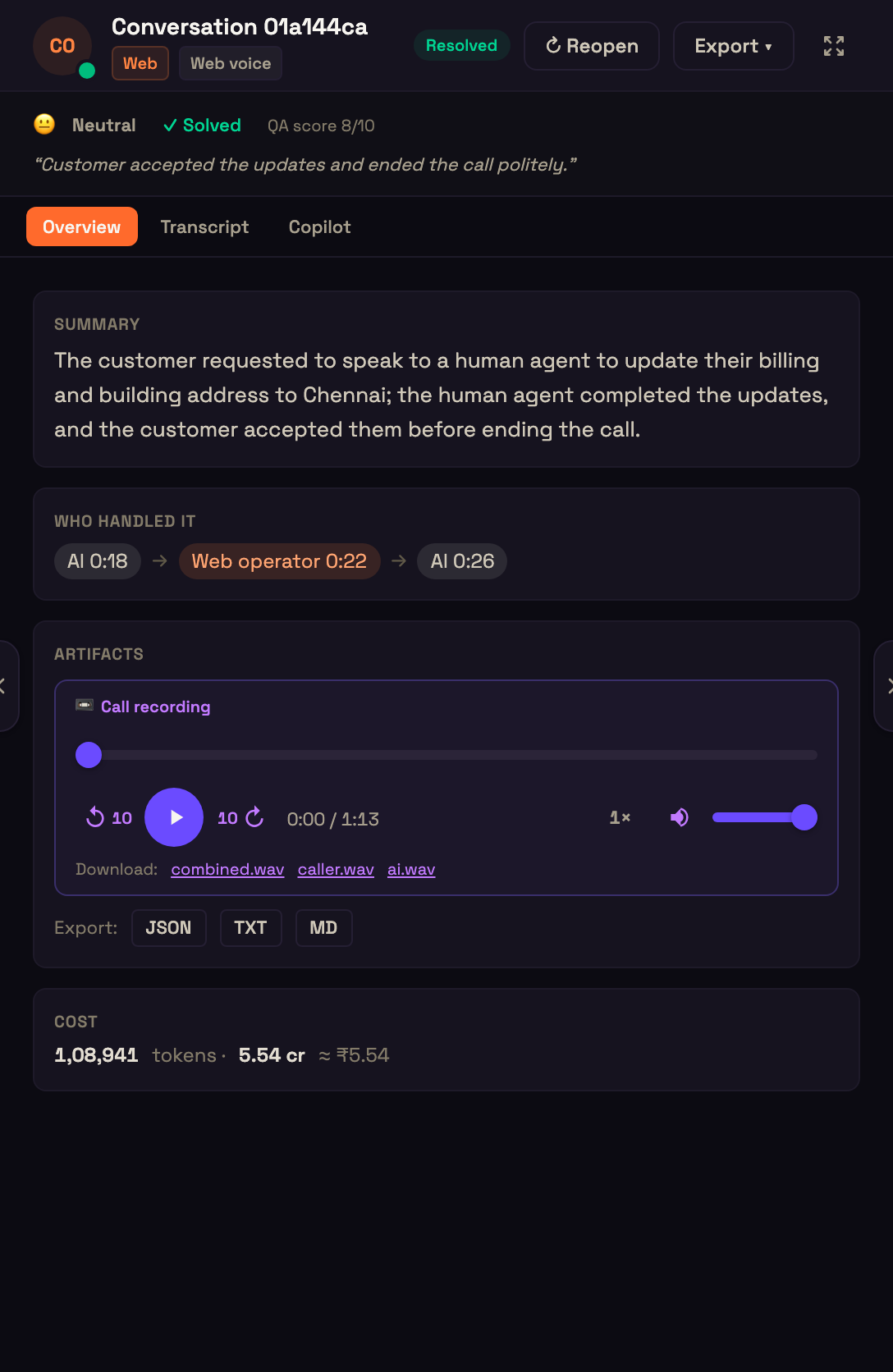
The same stretches feed the contact-center analytics tiles and the billing for human-handled time, so the handle time you see and the time you're billed for always agree.
Where things live in Studio
| What | Where |
|---|---|
| Who works this agent's conversations: web, phone and AI operators | The agent's Operator node → Team |
| Who answers first, where hand-offs go, ring times, queue, voicemail, waiting sounds | Operator node → Routing |
| Who can watch and step into this agent's conversations | Operator node → Supervision |
| What operators start with on a call | Operator node → Copilot |
| Taking calls and chats | Engage → Conversations (Operator console) |
| Watching the floor live | Monitor → Live board (Live board & supervising) |
| History and trends | Monitor → Analytics, Contact center row |
Nothing is implicit: only people listed on the Operator node are rung, the AI can hand off only if Routing sets up a hand-off, and only the supervisors listed there can supervise this agent's conversations.
Billing for human-handled time
Time a person drives a conversation (a web operator, a phone operator, or a supervisor who took over) is billed from your credits as per-minute compute, at the standard per-minute rate. AI answers and transcription used during that time are billed as usual, and the phone leg runs on your own Plivo account.
It's billed by activity, not by the clock: gaps between lines count for at most 5 minutes, so a chat an operator took over and then left idle isn't billed for the idle hours. Each stretch is billed once, from the same stretches you see in Who handled it.
Where to go next
- Set up the Operator node: every setting, tab by tab.
- Operator console: taking calls and chats.
- Live board & supervising: watching the floor and stepping in.
- Security & privacy: who can do what, and what stays protected.
- Use cases: 16 worked examples with the exact setup.