Set up the Operator node
This page is for admins. Open the agent in Build → Agents. If the AI Agent has no Operator node, add one, then click it. It has four tabs: Team, Routing, Supervision and Copilot.
A first setup, in four steps:
- Team: add the people who take this agent's hand-offs.
- Routing: turn When the AI hands off on and tick who to try.
- Supervision (optional): add the team leads who may listen in or take over.
- Publish, then have your operators click Go online in Engage → Conversations.
Use case 1 walks through exactly this.
1. Team: who works this agent's conversations
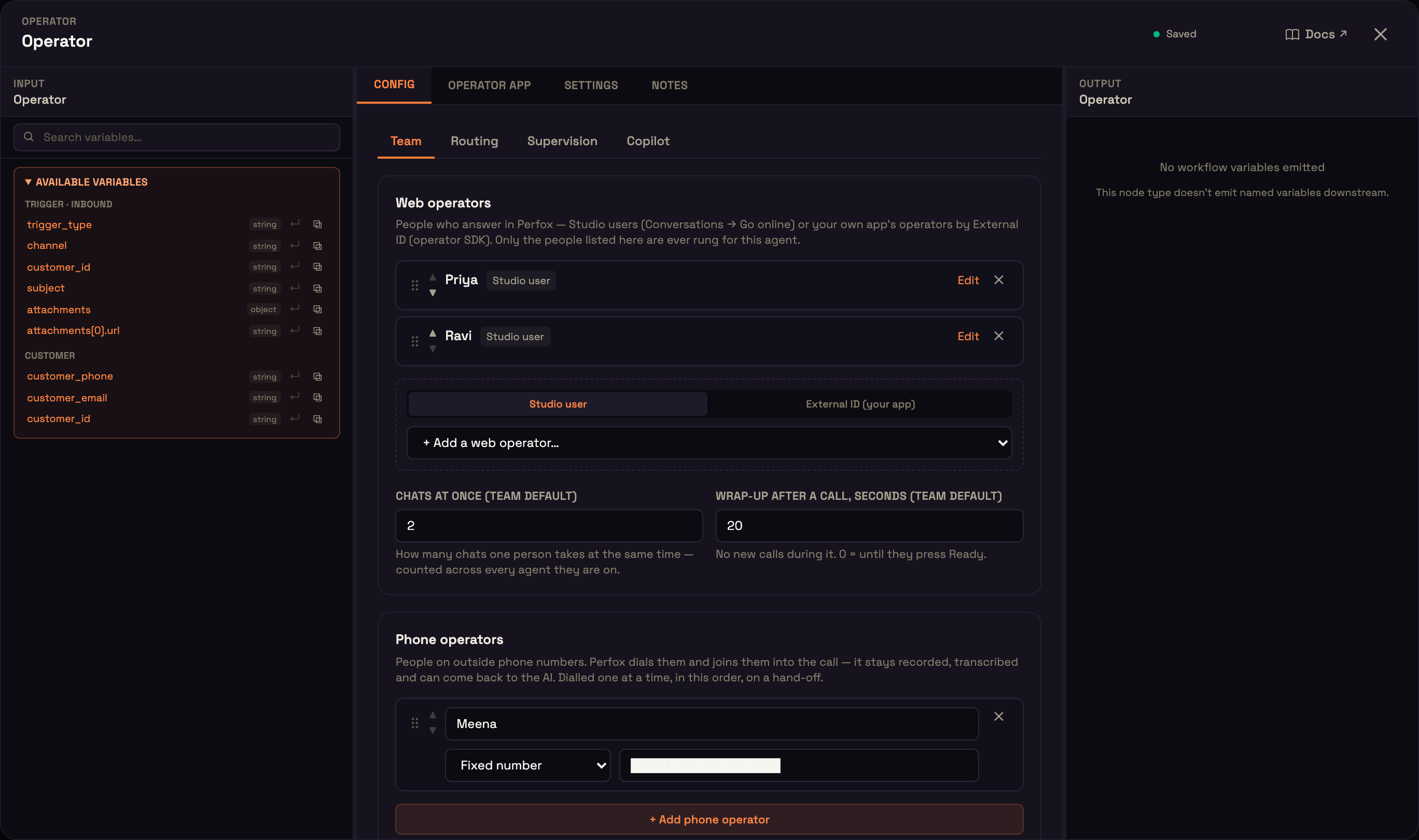
Web operators
People who answer in Perfox. Add each one as a Studio user of your workspace (they take calls with Conversations → Go online) or an External ID for an operator who connects through your own app with the operator SDK. Drag rows to reorder them; the order matters for the "in the order listed" ring style. Per person, all optional:
| Field | What it does |
|---|---|
| Skills | Such as billing, refunds. Blank takes any hand-off; set, only hand-offs asking for one of them. |
| Languages | Codes such as en, ta. Blank takes any customer. |
| Chats at once | Text conversations this person holds together. Blank uses the team default. |
| Wrap-up, seconds | Quiet time after each interaction. Blank uses the team default. |
Team defaults: Chats at once 0–10, default 3, counted across every agent the person is on; Wrap-up after a call 0–300 seconds, default 30 (0 means until they press Ready).
Phone operators
A name and a number: a fixed number, or one from workflow data (such as the customer's account manager). The AI never chooses who is dialled. Click + Add phone operator to add one. Perfox dials phone operators on a hand-off, one at a time in the order listed, and joins them into the call; the call stays recorded, transcribed, and can come back to the AI. Phone operators are dialled from the agent's own phone number: the number on its Phone Call trigger, which must be listed on a Plivo connection (Admin → Connections). That number is what the phone operator sees as the caller ID. There's no workspace default number: if the agent has no Phone Call trigger number, or no connected Plivo account lists it, nothing is dialled and your admins get a notification explaining the fix.
A phone operator's number must be in a country your workspace may dial (India by default), and premium-rate or special-rate numbers are never dialled. See Security & privacy.
AI operators
Let the AI pass a voice call to another of your published agents. Click + Add AI operator and give each one:
- Name the AI uses: lowercase, no spaces, such as
refunds; - Agent that takes the call: a published agent other than this one;
- Transfer when: the AI picks the AI operator from this text.
The new agent takes the call with its own persona, tools and voice, and hears the conversation so far. Its caller rules (keypad input, the quiet-caller check-in, failed turns) apply the moment it takes the call, so a key the caller presses goes to the new agent's menu. The caller is never dropped. AI operators aren't offered in chats.
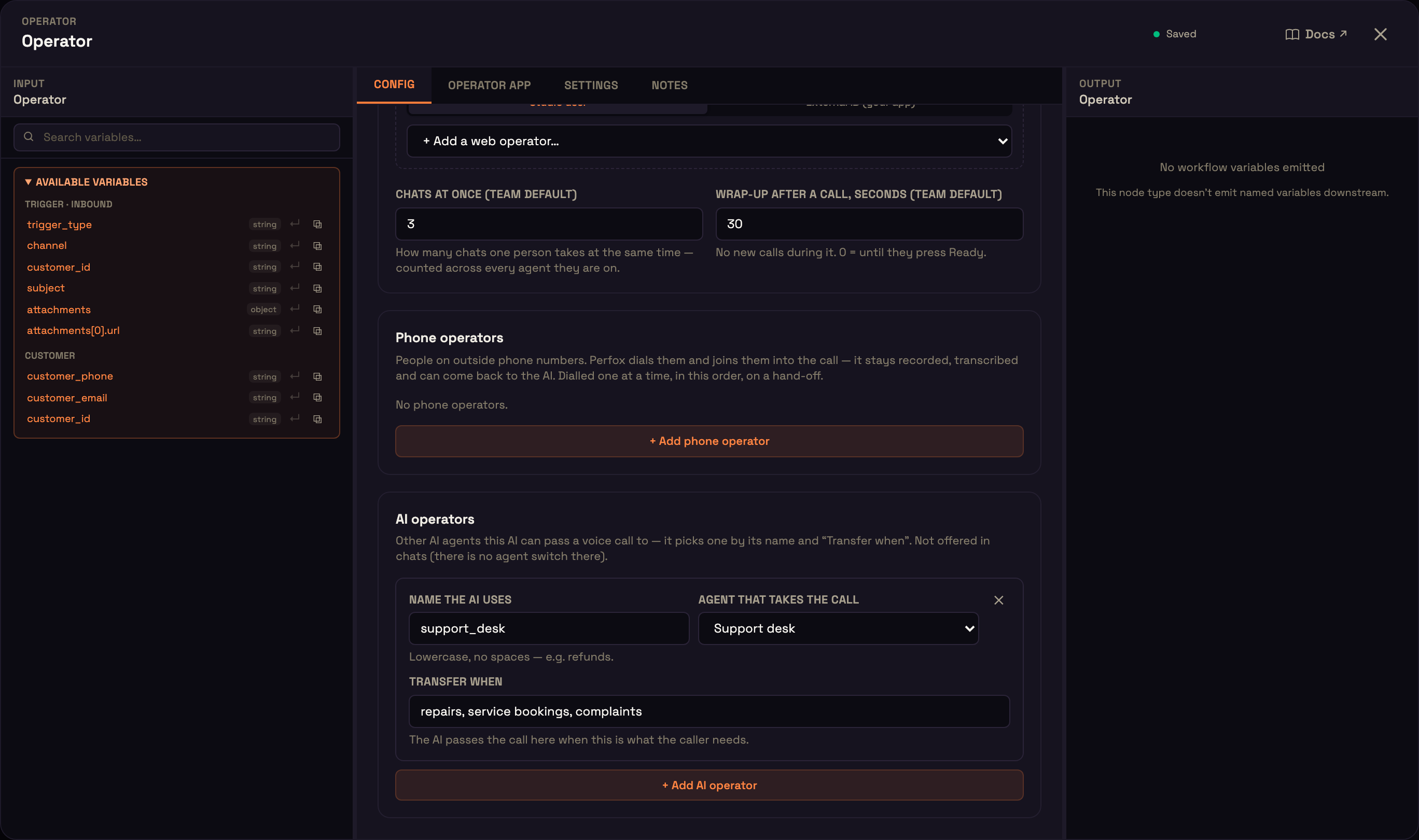
Publish stops on a row with no person, a person listed twice, a phone operator with no usable number, or an AI operator with no agent or no "Transfer when".
2. Routing: who answers, and where hand-offs go
Who answers a new phone call? applies to inbound phone calls only; web chat and web voice always start with the AI.
- The AI (default).
- The team (the AI assists): your web operators are rung first, with a Ring style (default everyone at once), Ring for, seconds (5–120, default 30) and an optional skill. If nobody on the team is online when the call arrives, the AI answers it; if they're rung but nobody picks up in time, the call ends. Phone operators are dialled only on a hand-off. Needs at least one web operator.
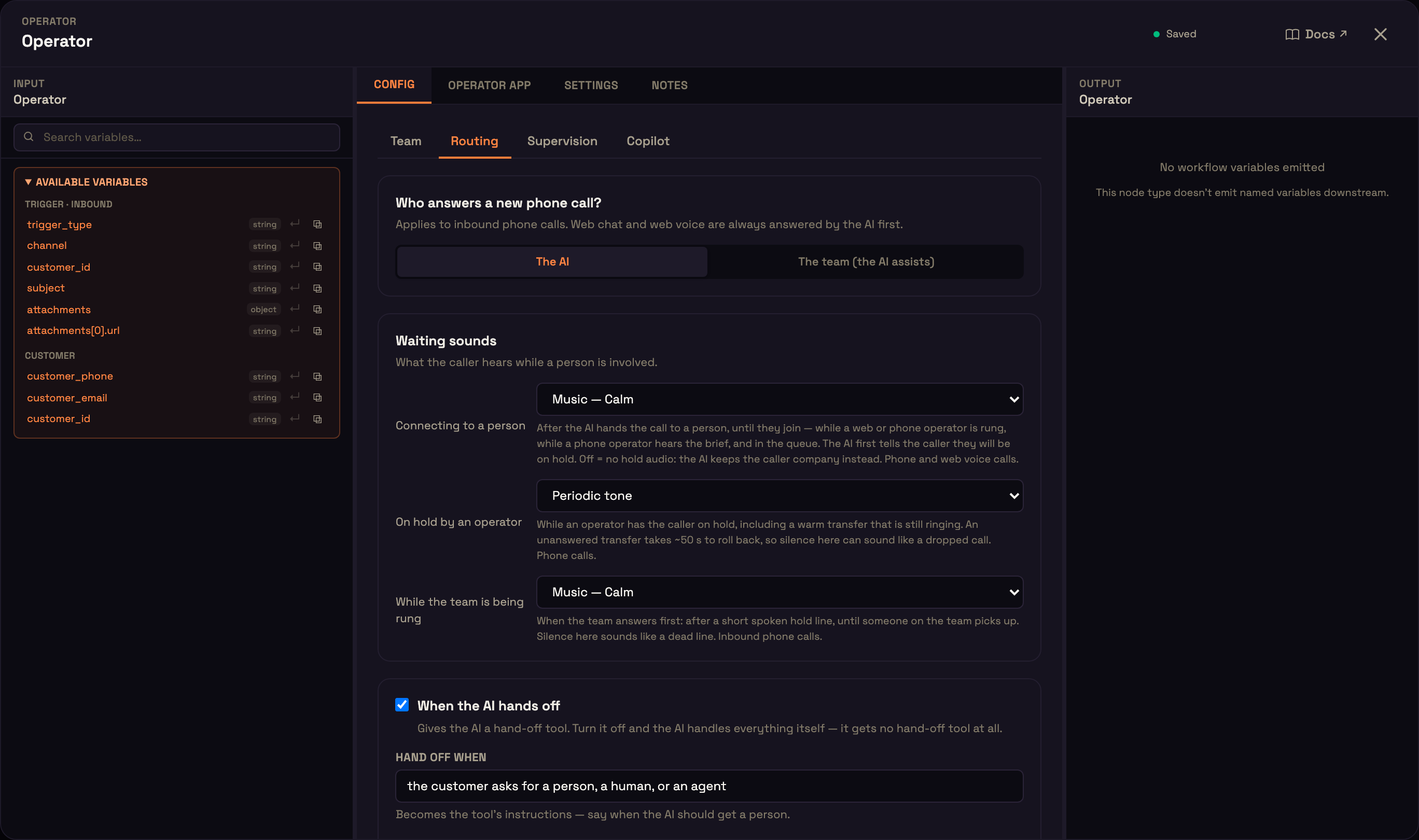
When the AI hands off is a switch. Off means the AI can't hand off at all and handles everything itself. On:
| Field | What it does | Default |
|---|---|---|
| Hand off when | Tells the AI when to get a person (up to 500 characters). | — |
| Try in this order | Drag Web operators (tick, then choose a ring style) and Phone operators into the order to try. A ticked group with nobody on the Team tab is flagged. | — |
| Ring each person for, seconds | 5–120 | 30 |
| Only web operators with this skill | Blank rings anyone listed. | blank |
| If everyone is busy, wait in queue up to (s) | 0–900. 0 means no queue. | 120 |
| Tell the caller their place every (s) | 0 means never; otherwise 20–300. Voice calls. | 0 |
| If nobody answers | Take a voicemail, or The AI keeps helping; the team calls back. | AI keeps helping |
| When the person leaves the call | Back to the AI or End the call. | Back to the AI |
| Flag the conversation and notify the team on every hand-off | With no group ticked and no AI operator, this is all the hand-off does: the AI tells the customer the team will follow up. | — |
AI operators on the Team tab are offered to the AI as their own targets on calls. On chats, WhatsApp, SMS and email, only web operators are offered the hand-off: phone operators and AI operators are for calls, so an agent whose only group is phone operators flags a chat and notifies the team instead.
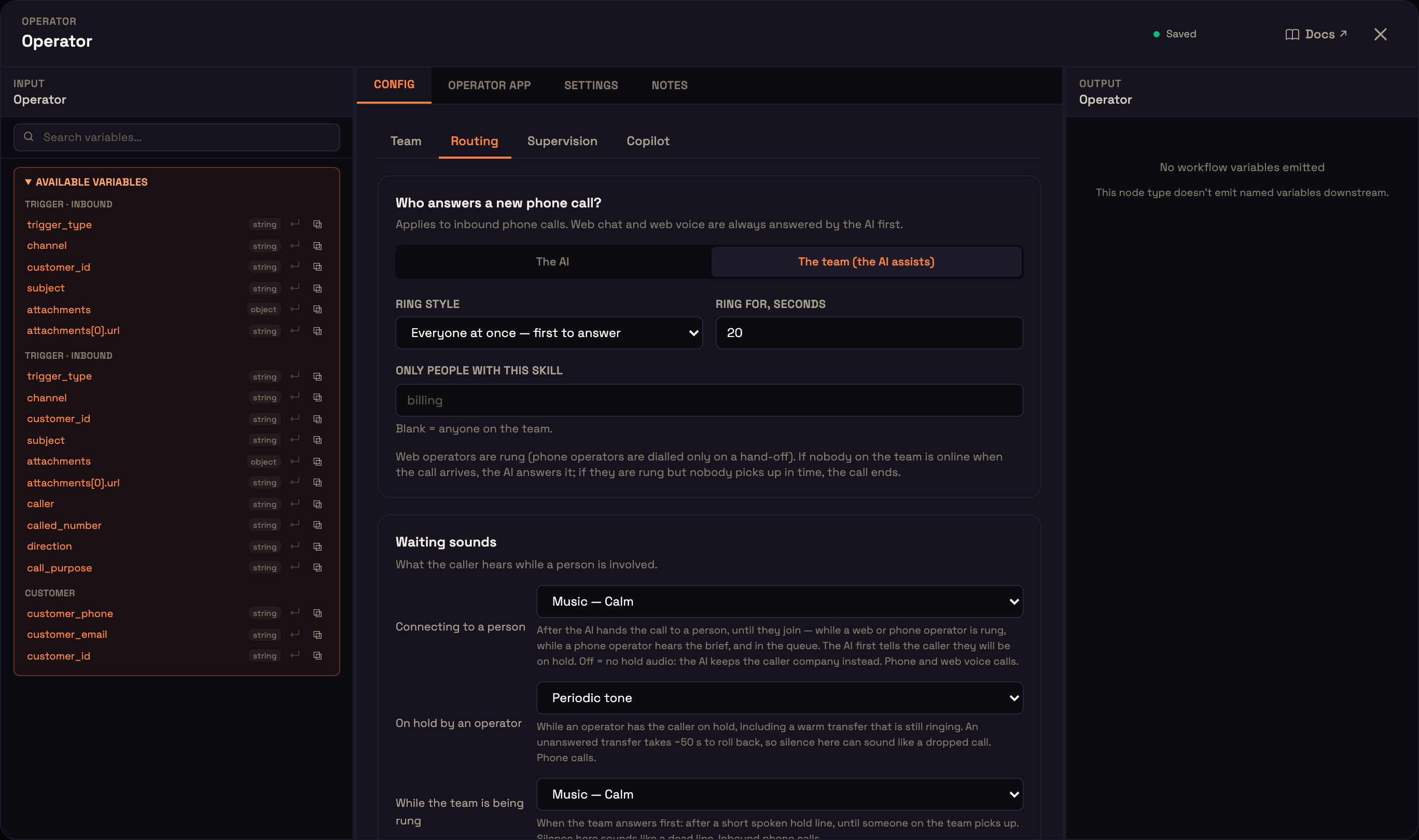
A voice call with the AI is capped at 10 minutes, so on a long call a queue wait ends early enough for the AI to close the call properly.
Waiting sounds: what callers hear
Three sounds are on Routing → Waiting sounds:
| Sound | Plays | Default |
|---|---|---|
| Connecting to a person | After the AI hands off, until a person joins: ringing, a phone operator's brief, the queue. Phone and web voice. Off means the AI keeps the caller company instead. | Music — Calm |
| On hold by an operator | While an operator has the caller on hold, including while a warm transfer is still ringing. Phone calls. | Periodic tone |
| While the team is being rung | An inbound phone call when the team answers first: after a short spoken hold line, until someone picks up. | Music — Calm |
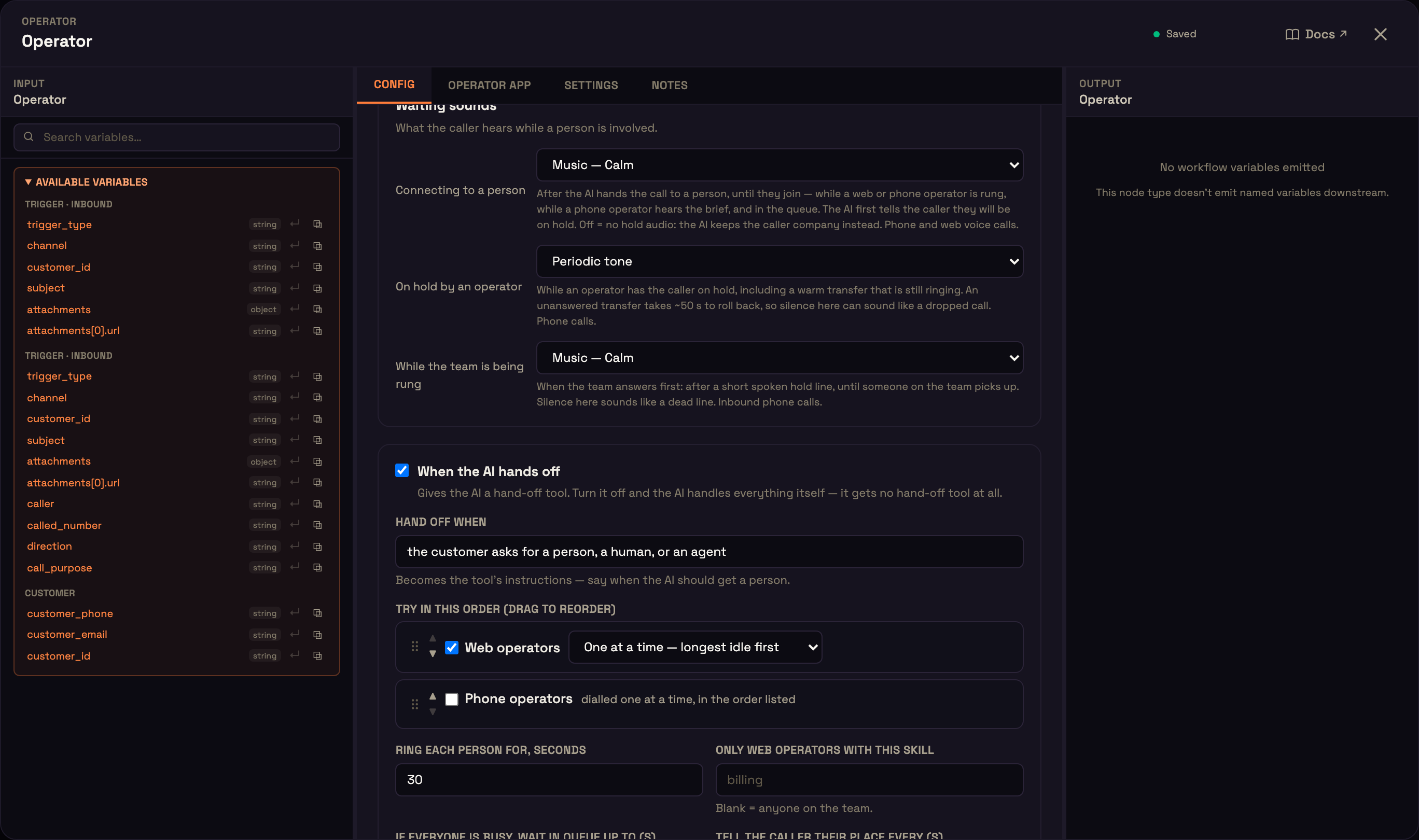
One more sound stays on the agent's AI Model node, section While the caller waits: AI looking up, while the agent runs a tool (default Off). See AI Model.
Each sound offers Off (silence), Periodic tone, Music — Calm, Music — Bright and Music — Soft chimes. Spoken ("One moment, let me check") is available only on AI looking up with the Pipeline voice.
3. Supervision: who can watch and step in
Turn Supervision on, add your supervisors, and tick what they can do:
- Listen in: hear the call or read the chat live.
- Whisper: speak to the person on the call; the customer doesn't hear it.
- Take over: join the customer and drive the conversation.
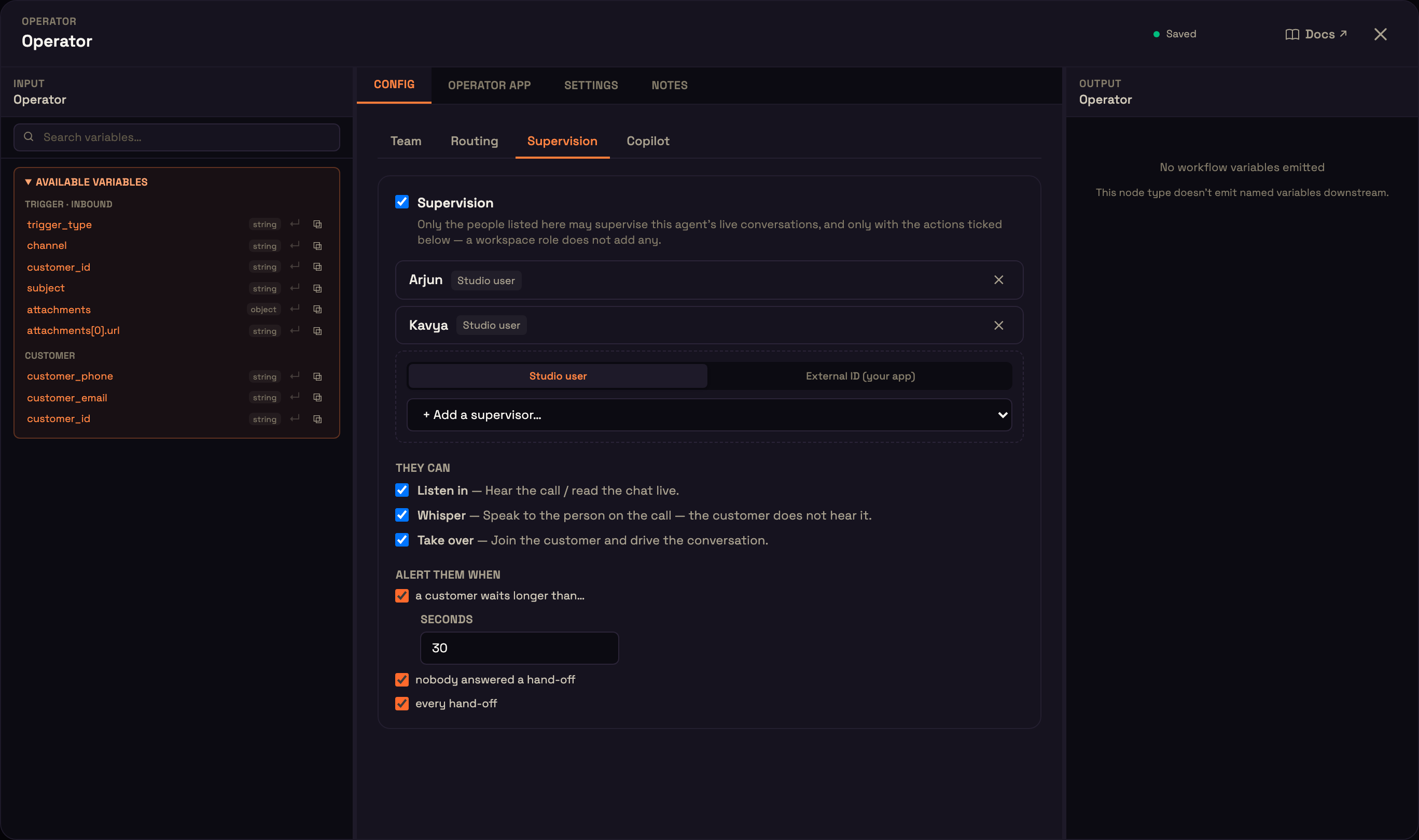
Alert them when a customer waits longer than a number of seconds (10–3600), when nobody answered a hand-off, and on every hand-off.
Only the supervisors listed here can supervise this agent's live conversations, and only with the actions ticked; a workspace role adds nothing on top. A supervisor must be signed in to your workspace, including two-step verification if their account uses it. See Live board & supervising.
4. Copilot: what operators start with
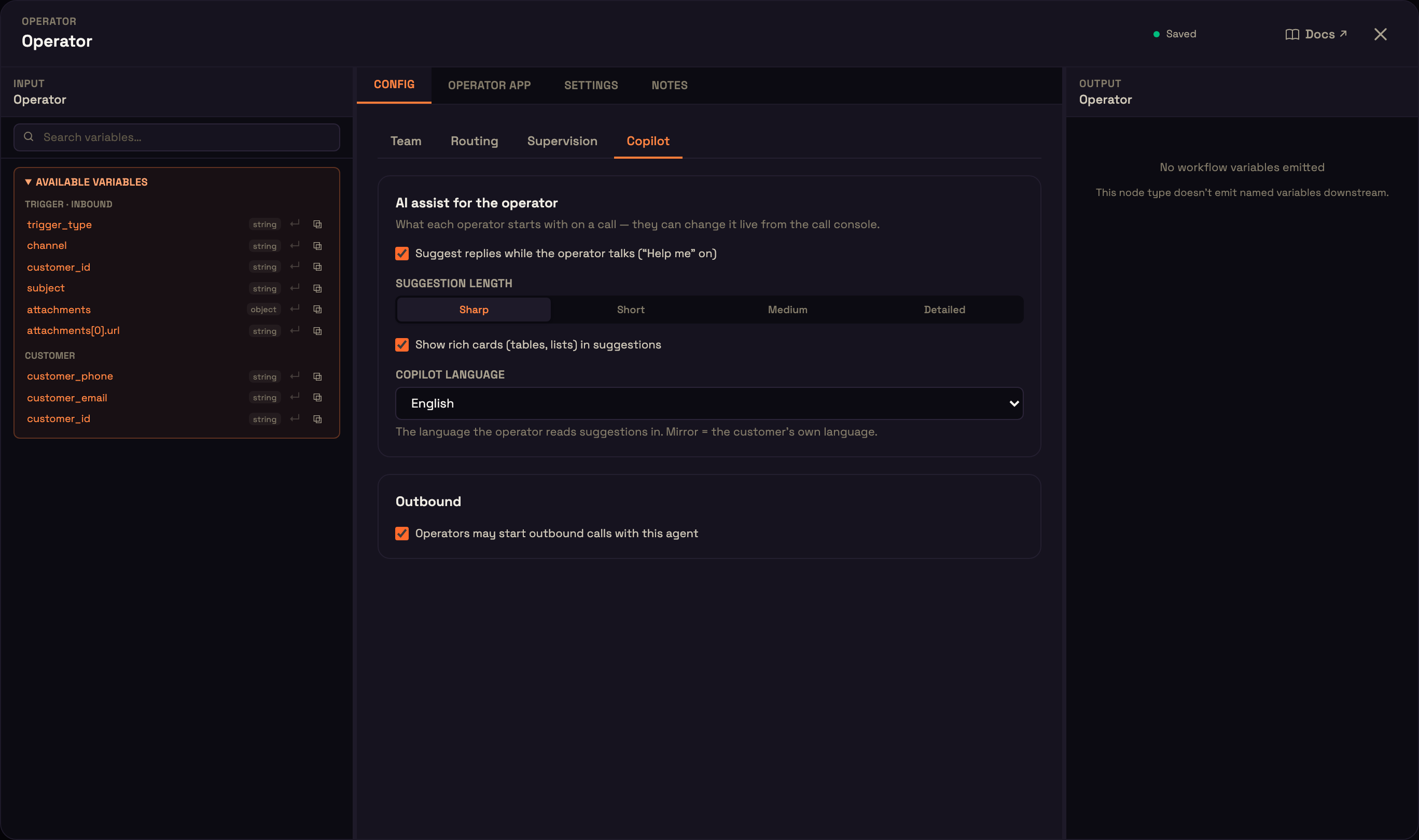
The Copilot tab sets what each operator starts with on this agent's calls. Each operator can change these during a call.
| Setting | Default |
|---|---|
| Suggest replies while the operator talks ("Help me" on) | on |
| Suggestion length (Sharp, Short, Medium, Detailed) | Sharp |
| Show rich cards (tables, lists) in suggestions | on |
| Copilot language (a language, or Mirror the customer) | English |
| Operators may start outbound calls with this agent | on |
With suggestions on, each customer question produces an answer card ("Customer asked", then key points and Copy) from the agent's own knowledge and tools, and the operator has an Ask the AI pane for their own questions. The AI never speaks to the caller. See Copilot.
Where to go next
- Operator (Copilot): the Operator node reference, including the canvas card.
- Use cases: 16 configurations to copy.
- Operator console: what your operators do.